
4D Write Pro: Tables without limit!

May 3, 2024
3 min read

Since the introduction of tables in 4D Write Pro, many new features have been put in place. Including Headers, footers, sort breaks and, of course, the possibility of associating a datasource with the tables to fill them in automatically!
This last option meant that the maximum number of rows per table (1000) could often be reached. We took this into account and as of 4D 20 R5, this limit is no longer fixed and controlled by 4D Write Pro but only limited by available memory!
Regardless of the datasource associated with a table, each element of the entity selection (or collection) will create a row in the table. This holds true even if the table contains sort breaks, bottom carry over rows, headers with several rows, or extra rows, it won’t pose a problem either. Long gone are the concerns about lengthy invoices, extensive nomenclatures, or big company directories!
Even if the 4D Write Pro areas has been optimised to handle bigger and bigger documents, the use of templates is therefore increasingly recommended allowing 4D Write Pro to efficiently fill the tables in an optimized way.
Limits on the maximum number of rows used to be there to prevent the interface freezing or memory overflows. Now that these limits have been eliminated, we recommend that you pay attention to the consistency between the power of the machines (and in particular their available amount of memory) and the number of rows you want to insert in the tables before printing or exporting your documents. The greater the number of lines, the greater the risk of slowing down the interface and responsiveness, but read more !
Now, more than ever, it is advisable to use templates that you test with a restricted set of data. This way, you can manipulate your tables (resize columns, change styles, etc.) without any risk of interface freezing issues.
You can then use the ‘real’ data (using the contexts) when printing or exporting, which will be done in separate workers (processes) and should not involve user interface in any way.
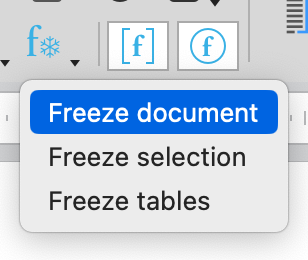
Formulas within your documents are very important, whether or not you use templates. That’s why we’ve added a confirmation dialog when a freeze action is requested via the interface. In this way, and even if an Undo is always possible, you’re safe from accidentally deleting your precious formulas.

We believe that this development will inspire you to make the most of 4D Write Pro to generate your documents, with no limits this time. An example of templates and workers use is provided in the HDI project. Don’t hesitate to use it as a source of inspiration!
Got a question, suggestion or just want to get in touch with the 4D bloggers? Drop us a line!
* Your privacy is very important to us. Please click here to view our Policy
Comments are not currently available for this post.