Find the right spot in your 4D Write Pro document with AI
In 4D applications, large documents are commonplace: financial reports, internal guidelines, technical manuals… Searching for an exact keyword often isn’t enough. Scrolling through 30-page reports to find one paragraph is not only time-consuming but also error-prone. This is where AI can help.
The semantic approach based on vectors, introduced in 4D 20 R10, already makes it possible to find a relevant 4D Write Pro document even when different wordings are used (for example, “insert image” vs. “add picture”).
But what happens when a document spans multiple pages and covers various subtopics? Even if the entire text can be converted into a single vector, results are often better when we work at a finer scale. This is the idea behind chunking: splitting a document into coherent segments, each represented by its own vector.
This is precisely what allows us to go further: retrieving not only the right document, but also the exact passage that matches the search.
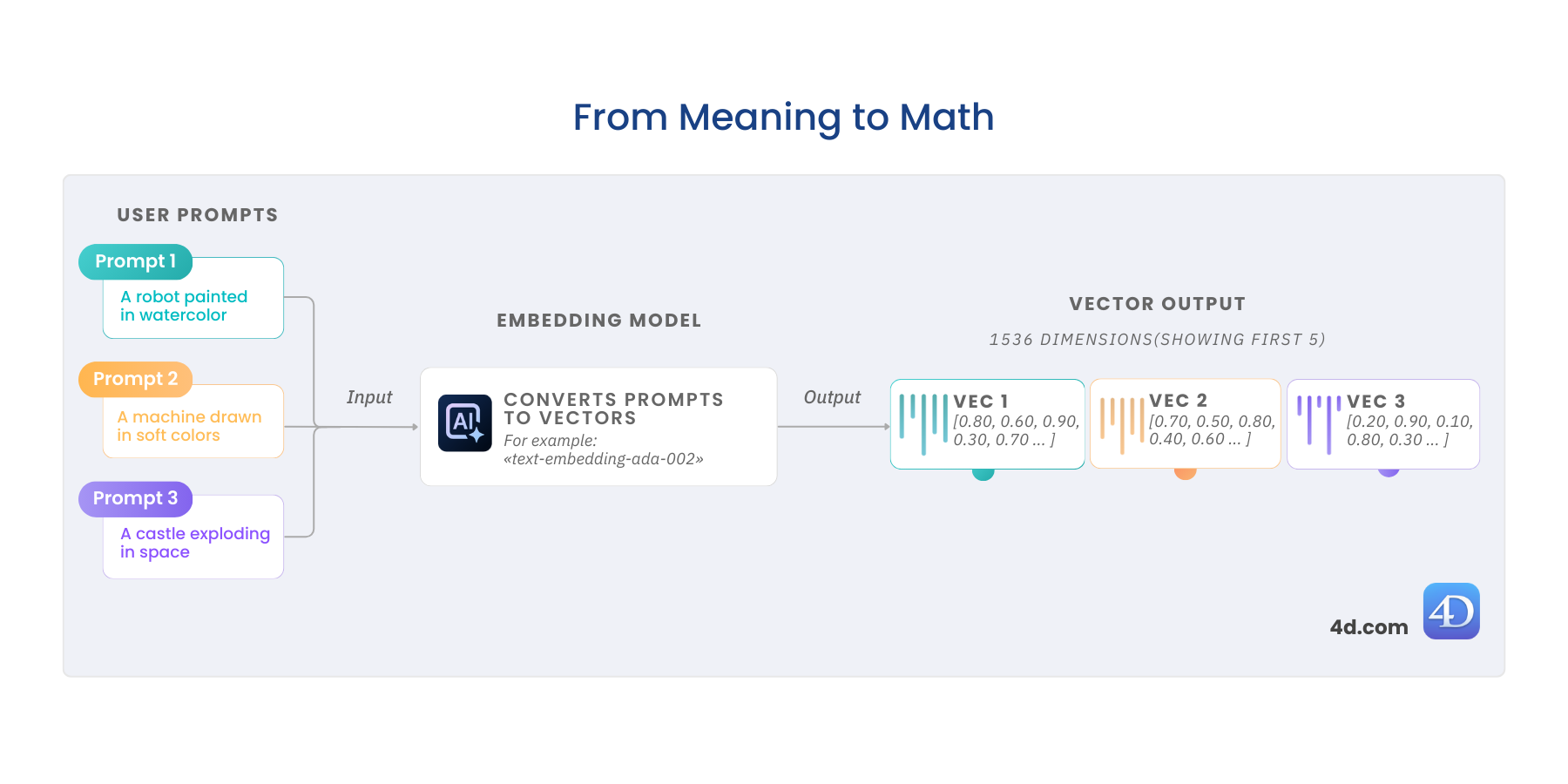
Search by Meaning, Not Metadata: Semantic Image Filtering with 4D.Vector
Your users don’t think in filenames or folder hierarchies. They think in ideas.
- “A robot painted in watercolor.”
- “A sunny beach filled with color.”
- “Something that feels like Mona Lisa… but from the future.”
It doesn’t matter if that idea comes from an image, a customer order, an email, or a 4D Write Pro document — the challenge is the same: how do you deliver results that match intent, not just keywords?
With 4D.Vector and 4D AI Kit, your application can finally make sense of meaning. In this post, we’ll illustrate it with semantic image similarity search. And here’s the key: we’re not really working with raw images at all — we’re working with their descriptions. The very same approach works for any kind of text data in your application.
Intelligent 4D Write Pro document analysis with AI
In many business applications, users enter or receive unstructured text: customer feedback, internal notes, support tickets, reports, and more. This content represents valuable information, but it’s difficult to leverage without specific processing.
This is where artificial intelligence becomes a powerful tool: by automatically analyzing the written content of a 4D Write Pro document, it can extract useful metadata for understanding, sorting, or prioritizing.
In this demonstration, we’ve implemented a complete scenario of automatic analysis of 4D Write Pro documents using AI. From a simple text, the AI is capable of:
- Generating a concise title reflecting the content
- Identifying the tone (positive, negative, informative, urgent…)
- Suggesting classification tags
- Evaluating the document’s writing quality
The goal is clear: automatically enrich documents with usable metadata, without changing the user experience.
UUID Improvements and Sorting with Version 7
Starting with 4D 20 R10, UUIDs are now generated directly using an internal algorithm instead of relying on system functions—giving you better control over their format and behavior. And with this update, you can now opt for version 7 UUIDs, which support chronological sorting. Let’s explore what this means for your applications.
ORDA – Constructor and touched event – Detailed behaviour through a network
In this previous blog post, you discovered that ORDA entities can now have a constructor, allowing entity instantiation to follow a complete object-oriented approach.
And that’s not all — another blog post introduced the first ORDA data event in a full series: the touched event.
Want to know exactly WHEN and WHERE the constructor and the touched event are triggered while actions move back and forth between a client application and the server? This blogpost is for you.
Keep reading to learn all the details and explore a live demo!
4D Qodly Pro: What’s new in 4D 20 R10
4D 20 R10 is now available and offers a new set of 4D Qodly Pro enhancements throughout the product to stabilize powerful features you might have already used.
Setting up HTTP handlers is now easier than ever.
When rendering a page, URL parts and parameters can now be accessed. And so many enhancements will help you offer your end users a better understanding of their user journeys and clear feedback for each of their actions.
Keep discovering this powerful fully-part-of-4D web development solution, robust and user-friendly.
Build business web applications with minimal coding effort by leveraging the existing business logic you’ve already implemented in your desktop applications.
Let’s take a closer look … Keep reading!
AI Brings Magical Search to 4D Write Pro Documents
In many 4D business applications, documents are everything — technical notes, reports, manuals, internal guides. But when users can’t remember the exact wording, finding the right one becomes slow, frustrating, or worse — impossible.
With 4D 20 R10, semantic search powered by AI vectors changes that. Instead of matching keywords, you match meaning. Users get the right document, even if they search in different words or a different language. It’s a smarter way to surface the knowledge hidden in your documents — fast, accurate, and built for how people actually search.
Let’s consider a concrete example: a user wants to locate a technical note that explains how to insert an image into a 4D Write Pro document. However, they may not recall the precise phrase used in the document.
SHOWCASE: SMART EXPENSE REPORTING WITH AI
You know the pain of expense reporting — not for you, for your users. The receipts piling up, the manual entry, the typos that slip through. With 4D AIKit, that grind is gone. A simple upload turns a paper receipt or invoice into clean, structured JSON, ready for your database.
No more wasted time on totals, dates, or vendor names. Vision AI reads it, language models structure it, and 4D ties it straight into your app. From paper to database in seconds — and your users never feel the friction.
4D AI: Discover the power of 4D Vectors
When working with modern applications, especially those involving Artificial Intelligence, natural language processing, or spatial data, vector math is key. That’s why 4D 20 R10 introduces a new object: 4D.Vector, designed to help developers store and compare data vectors with just a few lines of code.
For example, if you’re building a feature to rank images based on how well they match a text prompt, just generate vectors, compare them using cosine similarity, and sort your results from most to least relevant, all directly in 4D.
Why Your Search Stack Feels Broken — and How Vector Search Fixes It
You ask a question. Your system gives you keyword matches — close, but not the answer. The real insight? It’s buried in a doc, phrased differently, or hiding in a format your search can’t understand.
Now imagine search that gets what you mean — even if you don’t say it perfectly. That surfaces meaning, not just matching words.
That’s the shift we’re exploring in this blog post: what’s failing today, what’s replacing it, and why vector search is becoming the new default for teams that need clarity at scale.
Contact us
Got a question, suggestion or just want to get in touch with the 4D bloggers? Drop us a line!
* Your privacy is very important to us. Please click here to view our Policy