
4D AI: Discover the power of 4D Vectors

August 1, 2025
5 min read

When working with modern applications, especially those involving Artificial Intelligence, natural language processing, or spatial data, vector math is key. That’s why 4D 20 R10 introduces a new object: 4D.Vector, designed to help developers store and compare data vectors with just a few lines of code.
For example, if you’re building a feature to rank images based on how well they match a text prompt, just generate vectors, compare them using cosine similarity, and sort your results from most to least relevant, all directly in 4D.
Artificial intelligence integration isn’t just a trend — it’s becoming a key driver for modern business applications. That’s why 4D is investing deeply in native AI capabilities to support you. With 4D v20 R10, support for vector data begins with the introduction of 4D.Vector — laying the groundwork for a more powerful feature set coming in 4D 21.
This first release gives experienced developers the tools to start building smarter, AI-powered features directly in their 4D applications. But it’s just the beginning. Key enhancements like a vector index — essential for scaling performance — are still to come. In the meantime, we’re focusing on real-world use cases that show what’s possible today, including semantic search and natural language matching.
At its core, a vector is just a list of numbers, but those numbers represent something meaningful.
In AI, we use vectors to describe complex things like words, images, or even customer behavior in a way that machines can compare. Each number in the list captures part of what that thing means: its tone, style, topic, or context.
For example, the word “apple” might become a vector like [0.12, -0.45, 0.78, …]. Those numbers reflect how it’s used in language, maybe related to fruit, maybe to the tech company, depending on context.
These vectors live in a high-dimensional space, where similar meanings are close together and unrelated things are far apart.
This structure makes comparisons simple:
“Is this image conceptually close to that prompt?”
“Are these two documents talking about the same thing?”
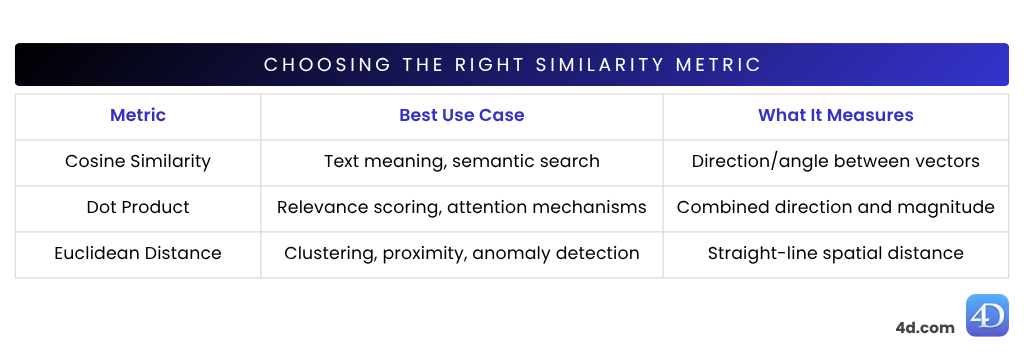
We use vector math, like cosine similarity, to measure how close two vectors are. The closer they are, the more related the meaning. That’s how modern features like semantic search, recommendations, and classification work.
Starting in 4D 20 R10, you can now work with vectors directly in your code thanks to a new native object: 4D.Vector.
It’s designed to make vector math simple and accessible so you can store, compare, and sort high-dimensional data without relying on external libraries. Need to measure how similar two items are? Just call built-in methods like cosine similarity, dot product, or Euclidean distance, all right inside 4D.
There are two simple ways to create a 4D.Vector, depending on where your data comes from:
If you want to turn a piece of text into a vector, for example, to compare ideas or power semantic search, you can use OpenAI’s embedding model through 4D AI Kit:
var $AIKey:="tDGWULQsrG..."
var $clientAI:=cs.AIKit.OpenAI.new($AIKey)
var $inputText:="Apple"

// Name of the embedding model to use
var $model:="text-embedding-ada-002"

// Call the OpenAI embeddings API to generate the vector for the input text
var $result:=$clientAI.embeddings.create($inputText; $model)

Var $myVector:=$result.vector
// $myVector=[0.013417294,-0.005096785,-0.001601552,-0.04005942,...]
This gives you a list of floating-point numbers that capture the meaning of your input. You can now use it in comparisons, ranking, or classification tasks.
If you already have vector data — maybe from an external service or model — you can create a 4D.Vector manually:
var $vector := 4D.Vector.new([0.123; -0.456; 0.789])Cosine similarity is one of the most widely used similarity metrics in Natural Language Processing (NLP) — ideal for comparing the meaning of sentences or documents. It measures how closely two vectors point in the same direction, based on the angle between them, not their size.

var $anotherVector := 4D.Vector.new([0.598; -0.951; 0.789])
var $similarity := $vector.cosineSimilarity($anotherVector)
// $similarity = 0,8949424061203
Range: -1 (opposite) to 1 (identical)
Great for: comparing sentence embeddings, semantic search, and document classification
Dot similarity (also called the scalar product) combines both direction and length of the vectors. That means it doesn’t just look at how aligned two vectors are, but also how strong they are.
If two vectors point in a similar direction and have large magnitudes, the dot product will be high, shown by thicker arrows in the diagram. 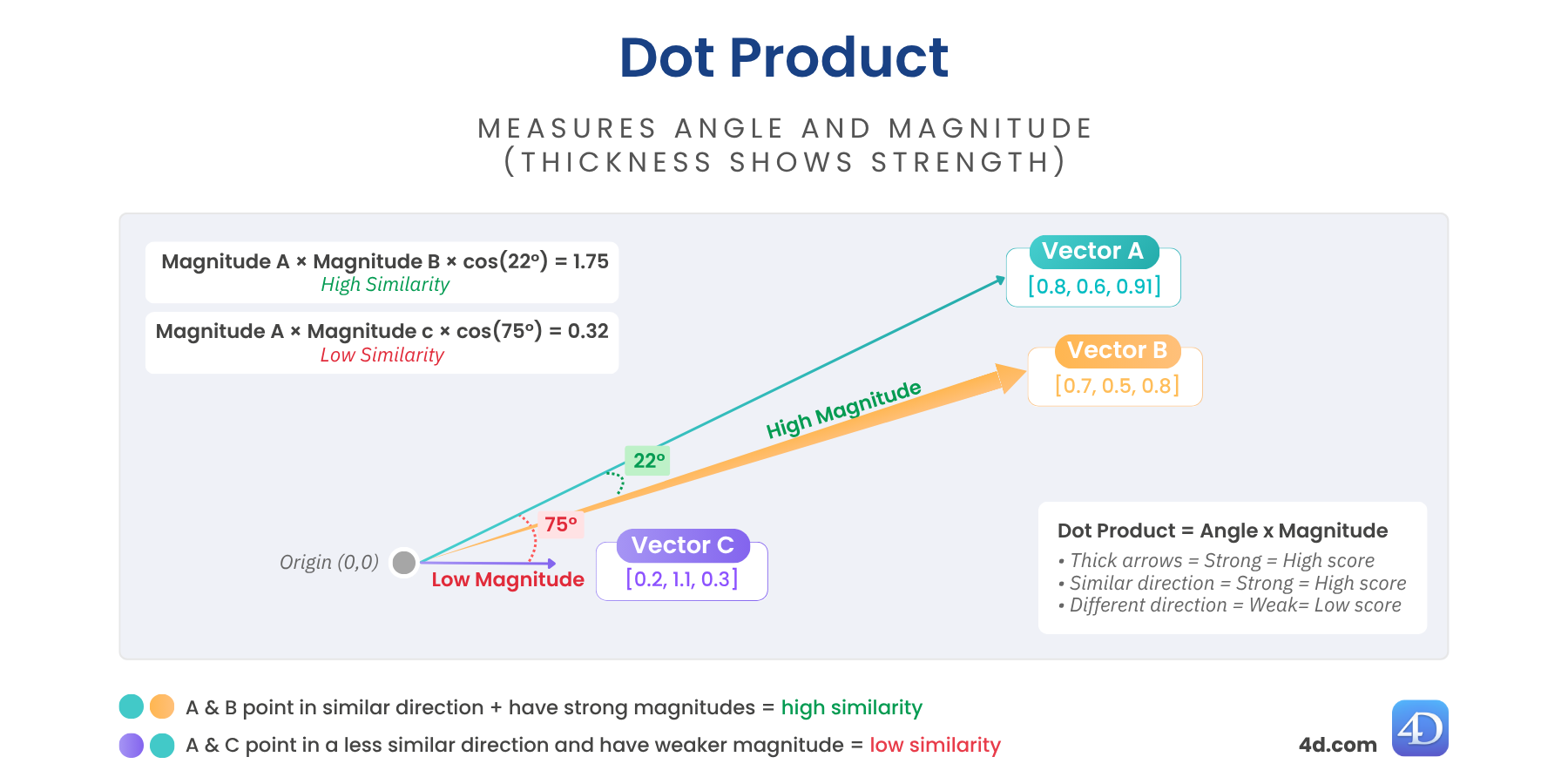
var $score := $vector.dotSimilarity($anotherVector)
// $score = 1,129731
Higher values = more similarity and stronger alignment.
Great for: recommendation engines, transformer models, fine-tuned embeddings
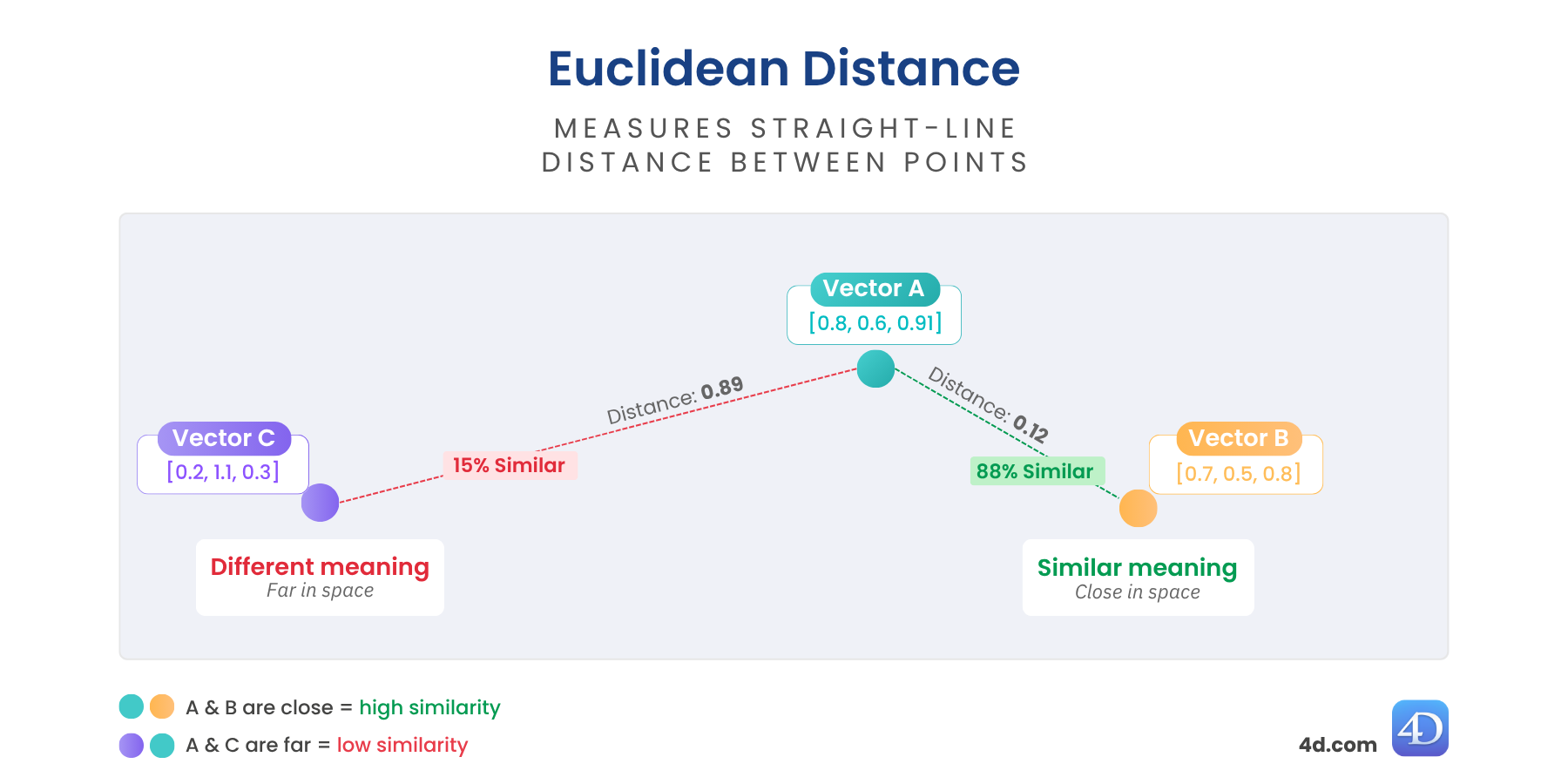
Euclidean distance gives you a real “as-the-crow-flies” measure between vectors. It shows how far apart two vectors are in space — the closer they are, the more similar their meaning. The farther apart, the more different they are.
It’s perfect when you need a true measure of dissimilarity — ideal for clustering, anomaly detection, or geospatial reasoning.
var $distance := $vector.euclideanDistance($anotherVector)
//$distance = 0,6860393574716
Lower = more similar
Great for: structured data, anomaly detection, or spatial proximity
The 4D.Vector object lays the groundwork for a whole new set of features in your applications. With just a few lines of code, you can:
Build search tools that understand intent
Power recommendations with real context
Rank, group, and filter data based on meaning, not just metadata
And it all runs natively in 4D, fast, flexible, and ready to scale.
Got a question, suggestion or just want to get in touch with the 4D bloggers? Drop us a line!
* Your privacy is very important to us. Please click here to view our Policy
Comments are not currently available for this post.