
ORDA – Constructor and touched event – Detailed behaviour through a network

August 25, 2025
6 min read

In this previous blog post, you discovered that ORDA entities can now have a constructor, allowing entity instantiation to follow a complete object-oriented approach.
And that’s not all — another blog post introduced the first ORDA data event in a full series: the touched event.
Want to know exactly WHEN and WHERE the constructor and the touched event are triggered while actions move back and forth between a client application and the server? This blogpost is for you.
Keep reading to learn all the details and explore a live demo!
If you haven’t explored yet the constructors and the touched event, don’t wait — read the blogposts mentioned above. They explain how the implementation should be done.
Those two features are part of the comprehensive, powerful and optimized ORDA abstraction layer. To refresh your memory, you can read this blogpost and this one.
With ORDA data model classes, data is handled through entities, which are instances of the Entity classes defined in your Structure.
ORDA can be used across multiple types of apps:
The table below summarizes WHERE the constructor and touched event are executed:
| Where is executed | C/S (1) | Qodly page (2) REST API (3) Remote datastore (4) |
|---|---|---|
| The constructor | Client | Server |
| The touched event |
If local keyword: client |
Server |
(1): The project is deployed on a 4D server instance, and remote 4D clients access it over a network connection. Data operations can run on either the client or the server.
(2): The project is deployed on a 4D server instance, and web clients interact with it via a web browser. A Qodly app consumes the REST API of the project.
(3): Any external application can consume your 4D application’s REST API using standard REST requests.
(4): A 4D application can connect to one or more remote datastores, enabling access to multiple data sources. In this case, ORDA is used to handle remote data operations.
The rest of this blogpost focuses on WHEN the constructor and the touched event are executed.
For optimization and performance reasons, the constructor is not necessarily executed immediately when a new entity is instantiated. Same for the touched event. Is not necessarily executed immediately when an attribute is updated.
Let’s dive into the specifics for each app type.
In a standalone app, the project is stored on your local disk. No network connection is needed to access data, so all data operations are performed locally and instantly.
Everything is straightforward: The constructor and the touched event are triggered immediately when a new entity is instantiated or when an attribute value changes.
This case is simple: since all actions on entities are performed via REST requests to the server, both constructor and touched event are triggered on the server as soon as the request runs.
If a new entity is instantiated on the client, then the constructor runs on the client.
This means, initial values assigned to attributes are immediately visible to the client. Later, when a function involving that entity is called (e.g., a function that receives the entity as a parameter), the server receives the entity with its attributes initialized on the client (1).
The function can be one of the ORDA API or an ORDA data model function.
(1) Remember ORDA functions are always executed on the server.

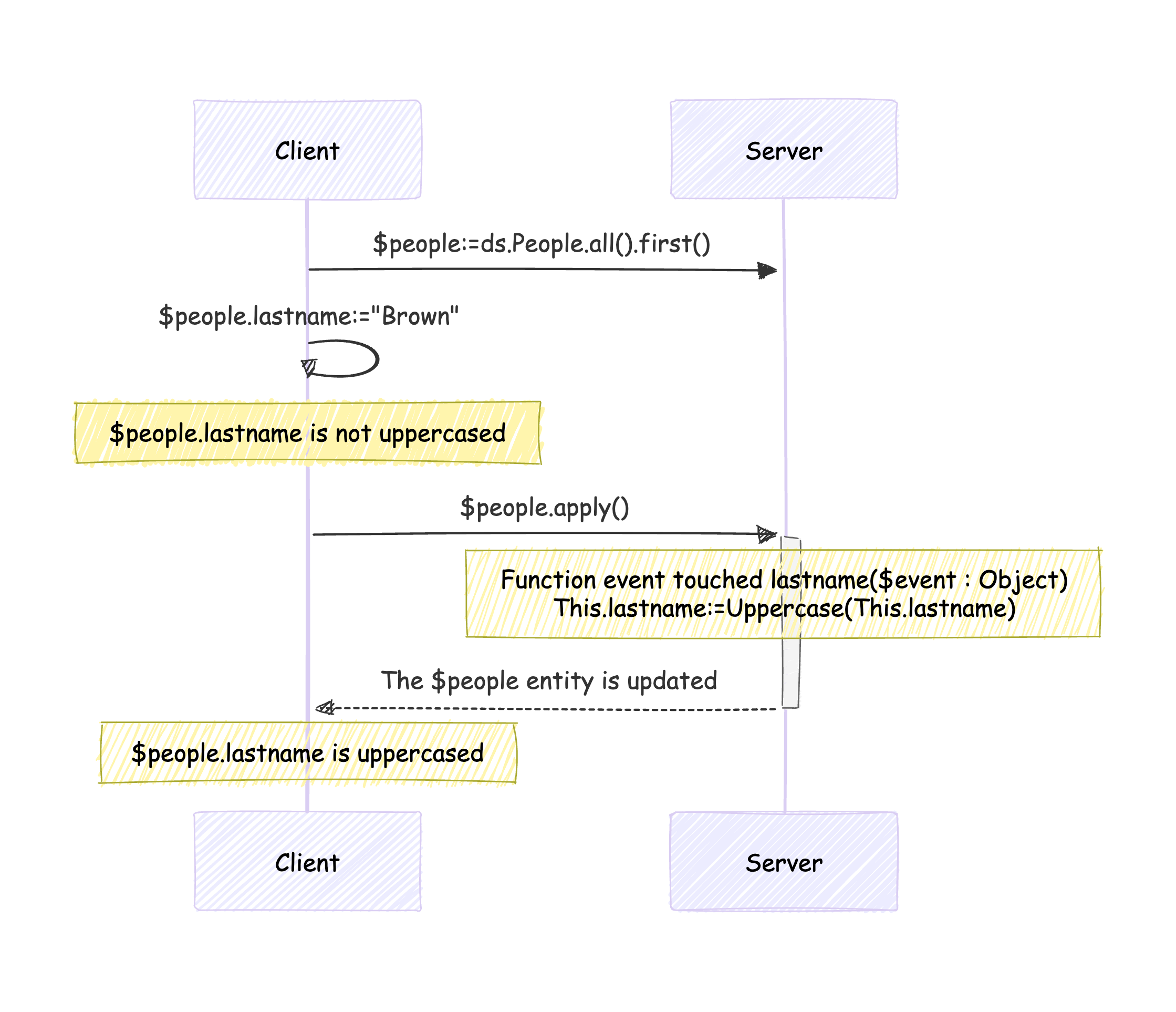
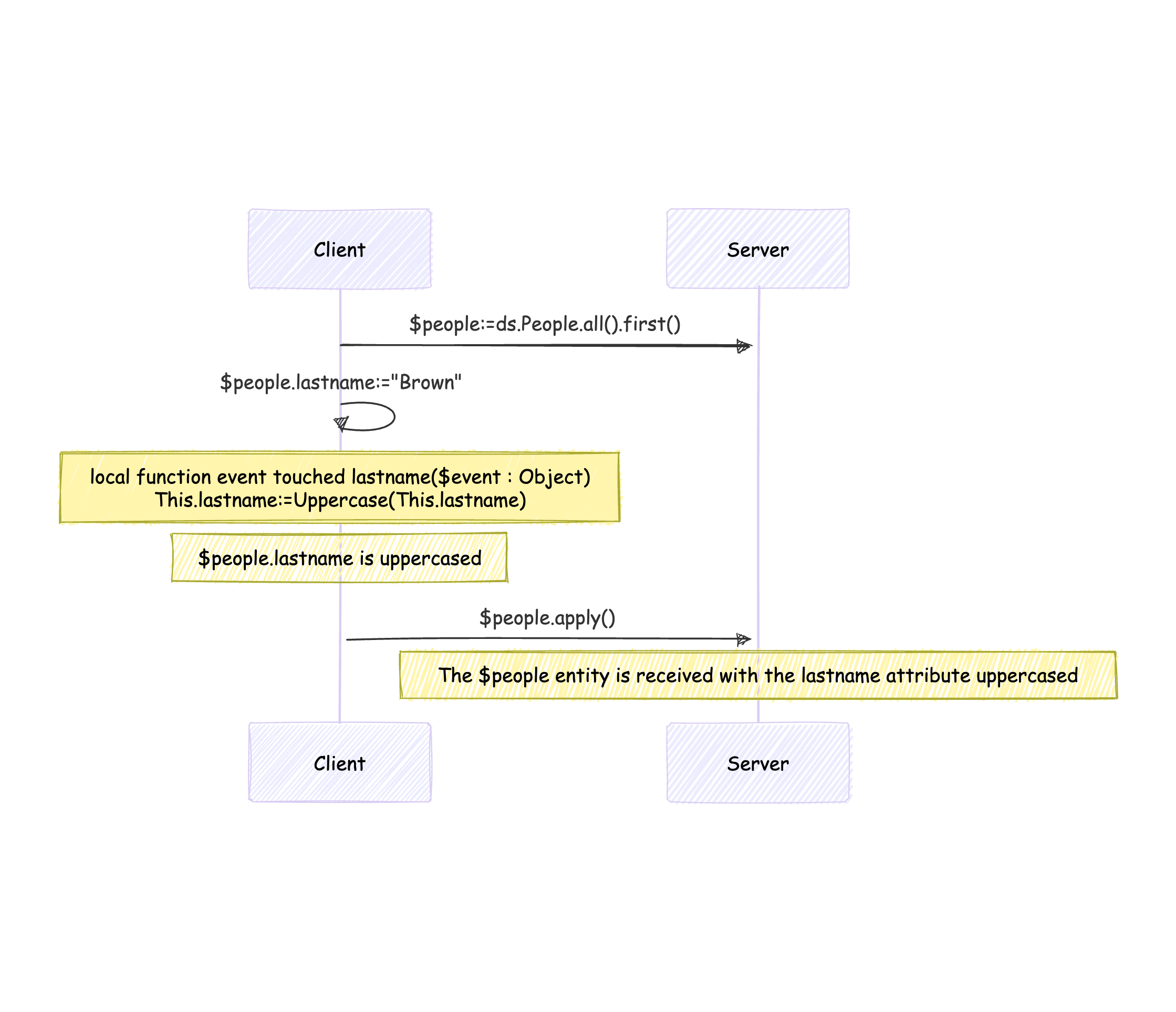
By default, the touched event is executed on the server, but the local keyword allows you to run it on the client instead.
Without the local keyword:
In this example, the apply() function is a dummy function, just to make the updates done on the entity on the client visible on the server.
With the local keyword:
Both constructor and touched event are executed on the server — as soon as the server becomes aware of a newly instantiated entity or of a changed attribute.
When rendered, a Qodly page runs in the web browser, but whenever an action requires server-side logic, requests are sent via REST API to the 4D server.
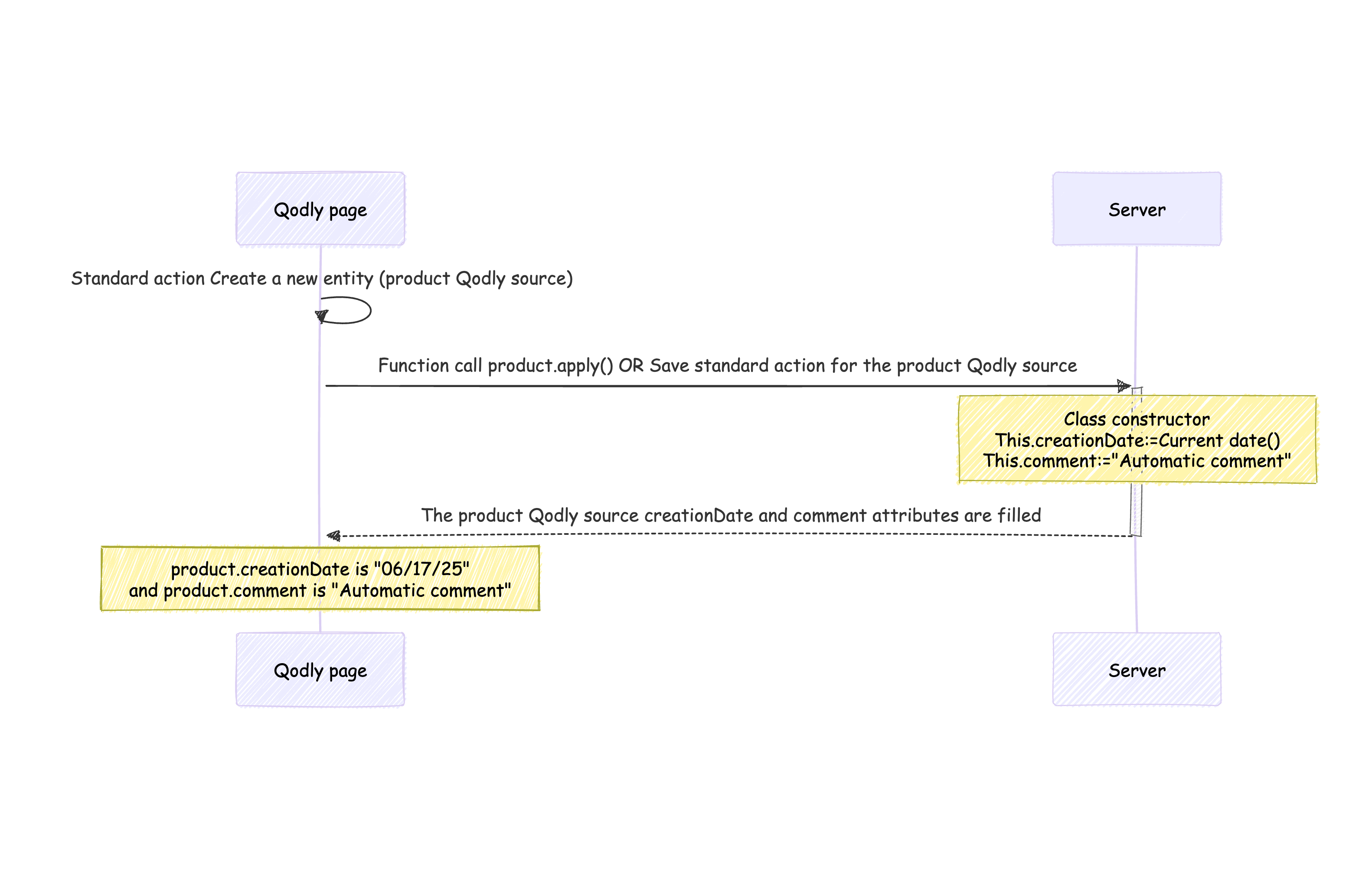
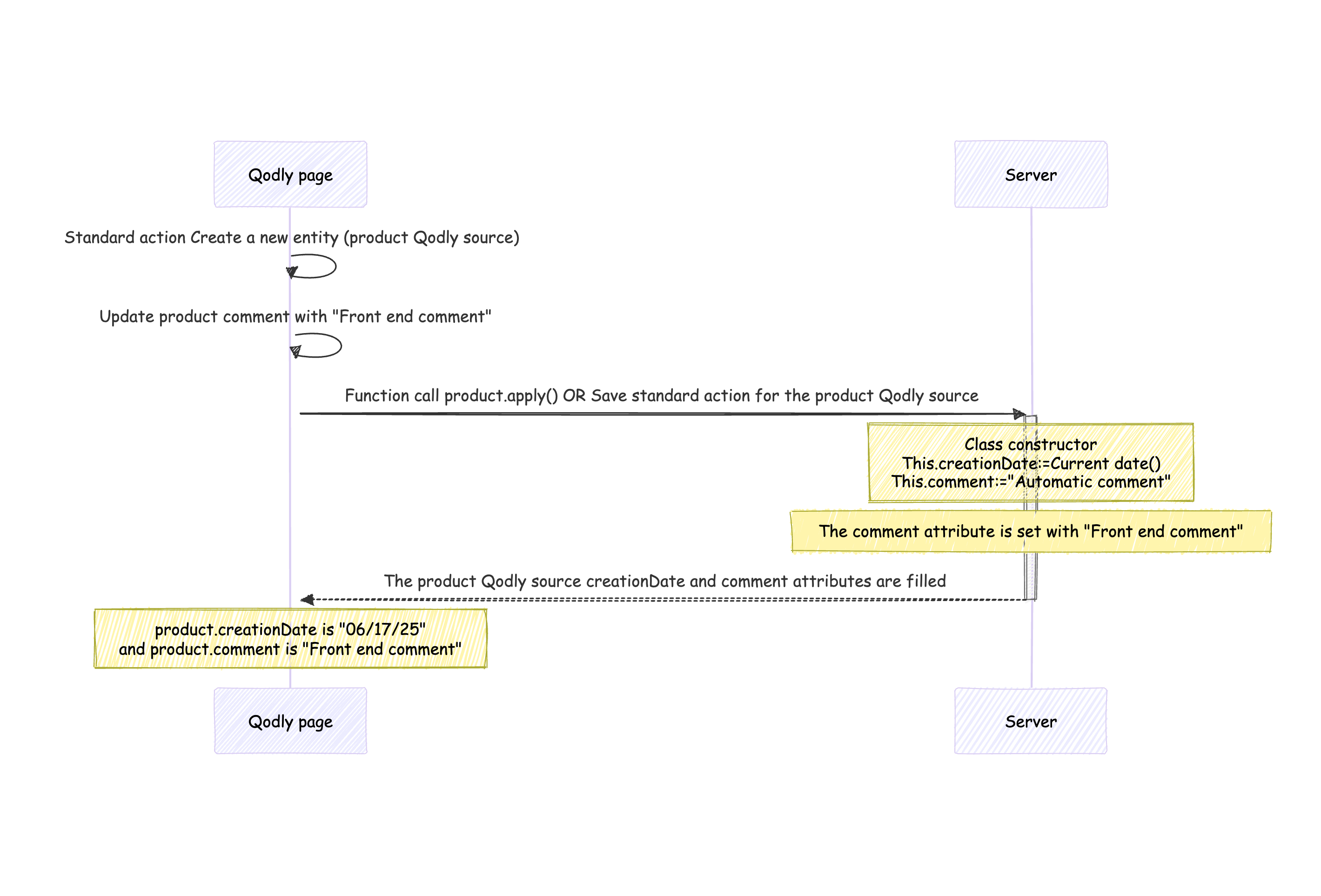
If you instantiate a new entity using the standard action Create:
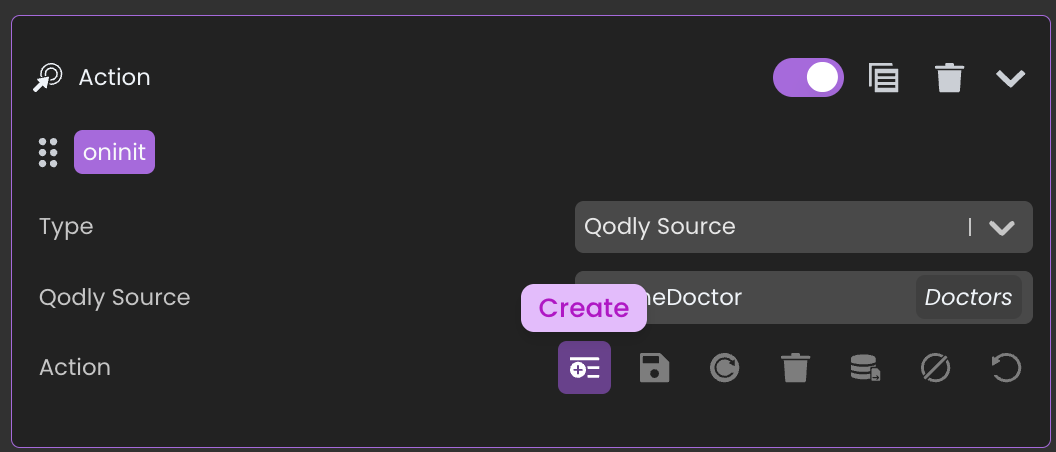
this occurs locally on the front end. So the constructor is not executed immediately. It runs once the server detects the new instantiated entity.
In this example, the apply() function is a dummy function, just to make the updates done on the entity on the client visible on the server.
Note:
If the front end instantiates a new entity with the standard action Create and sets a value for an attribute used in the constructor, that value will not be overridden by the constructor when it runs on the server.
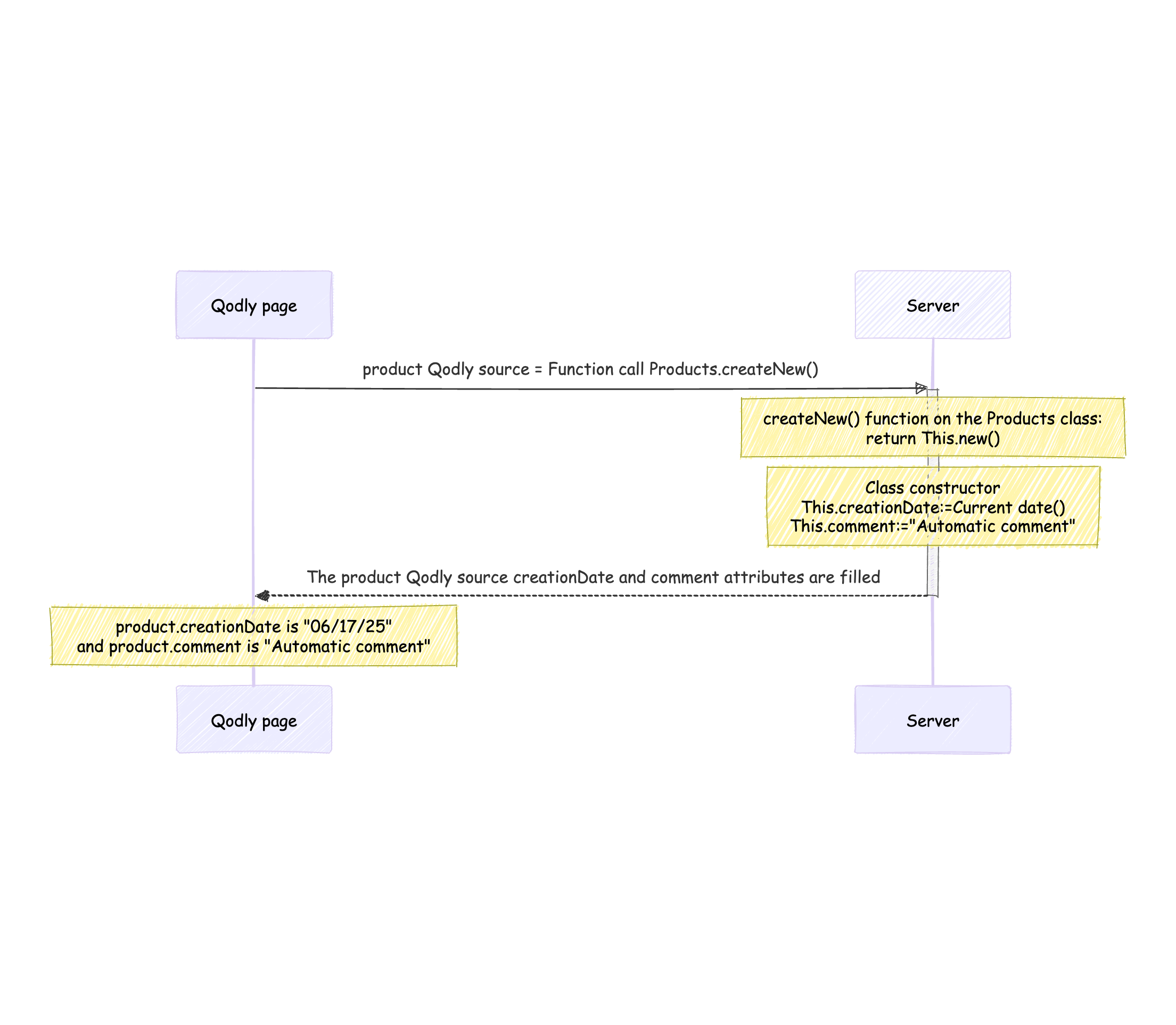
On the other hand, if the entity is instantiated through a server-side function, the constructor runs immediately on the server. The returned Qodly source (entity) will include the initialized attributes by the constructor.
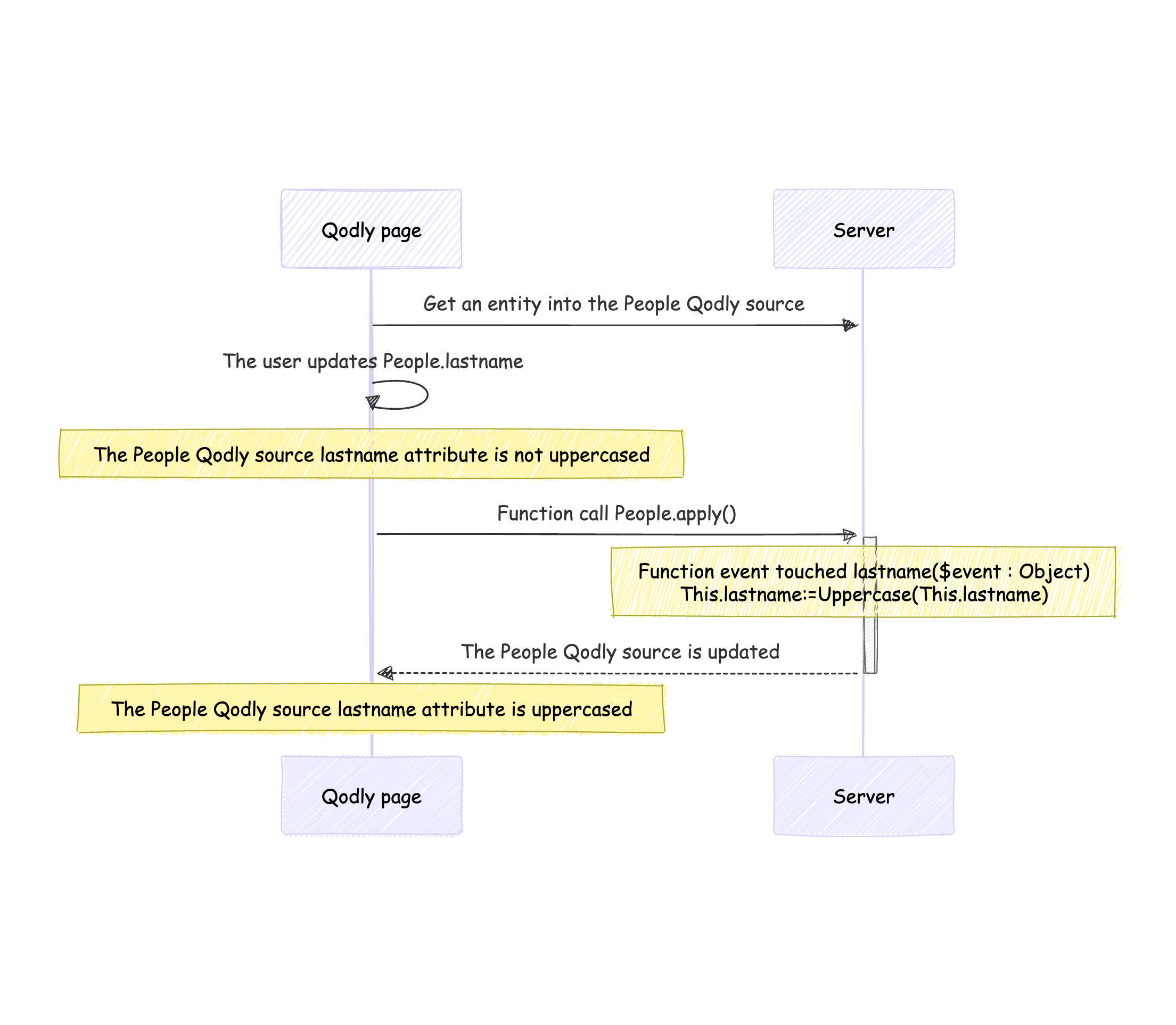
The touched event is triggered on the server as soon as the server detects a changed attribute value.
In this example, the apply() function is a dummy function, just to make the updates done on the entity on the client visible on the server.
This works much like a Qodly app since using a remote datastore triggers requests internally using the REST API. If a new entity is instantiated on the local 4D application, the constructor runs when the server becomes aware of it.
Same goes for the touched event — If an entity is updated on the local 4D application, it runs as soon as the server detects a change in the entity’s attributes.
A constructor is implemented in the ProductsEntity class.
Class extends Entity

Class constructor()

	This.creationDate:=Current date()
	This.comment:="Automatic comment"
This code is executed:
var $connect:={hostname: "127.0.0.1"}
var $remote : 4D.DataStoreImplementation
var $product : 4D.Entity
var $status : Object


$remote:=Open datastore($connect; "demo")

// The constructor has not been executed yet
// The creationDate and comment attributes are empty
$product:=$remote.Products.new()

// Here the constructor is run because the save() is done on the server
// The server detects it is a newly instantiated entity
// The creationDate and comment attributes are filled
$status:=$product.save()A touched event and apply() function are implemented in the ProductsEntity class:
Class extends Entity

Function event touched comment($event : Object)
	This.comment:=Uppercase(This.comment)

exposed Function apply() : cs.ProductsEntity
	return This
This code is executed:
var $connect:={hostname: "127.0.0.1"}
var $remote : 4D.DataStoreImplementation
var $product : 4D.Entity

$remote:=Open datastore($connect; "demo")

$product:=$remote.Products.all().first()

// The comment attribute is not uppercased
$product.comment:="New comment"

// Because the apply() function is called on the server
// the touched event is triggered
// and the comment attribute is now uppercased
$product:=$product.apply()
Play with the attached HDI to try these examples live!
Got a question, suggestion or just want to get in touch with the 4D bloggers? Drop us a line!
* Your privacy is very important to us. Please click here to view our Policy
Comments are not currently available for this post.