
ORDA Classes to handle your data model

July 20, 2020
5 min read

In a previous blog post, we introduced you to the world of ORDA data model classes. Now it’s time to get our hands dirty and learn more!
You already know that ORDA‘s structure (datastore, dataclass, entity, entity selection) is made up of objects. But they’re not just objects, they’re strongly-typed objects linked to specific ORDA classes. This means that you can write functions to hide the complexity of your data’s physical implementation.
Therefore it’s much easier to expose your database as an API, especially if you expose your database as a REST server. This also helps you to avoid headaches such as when you need to modify a piece of code you wrote years ago or that was written by someone else. Hiding complexity reduces errors and speeds up your development process!
HDI: Examples to use ORDA classes
ORDA classes are automatically available with Projects, let’s see an example. Here’s a simple database (named LearningSystem) containing a Students table.
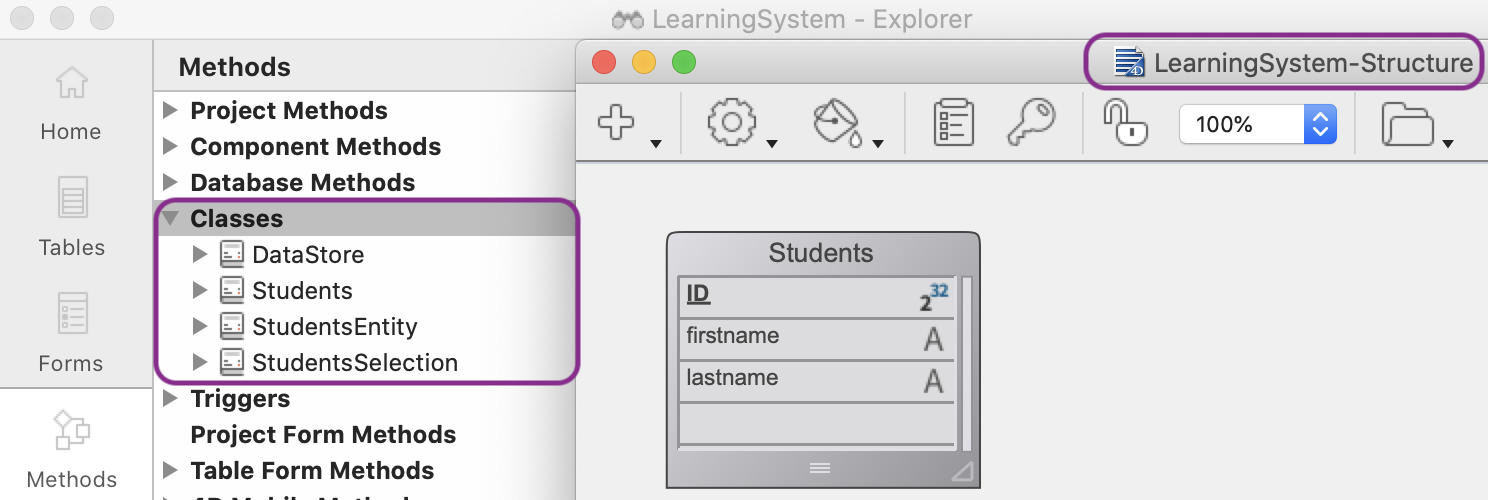
We can verify that 4D has automatically created the following classes:
To summarize, in a local database there is:
And each table has:
Any ORDA object (datastore, dataclass, entity, entity selection) is an instance of the corresponding data model class and can call any of the functions defined in the class.
Within a function, This designates the instance of the ORDA object.
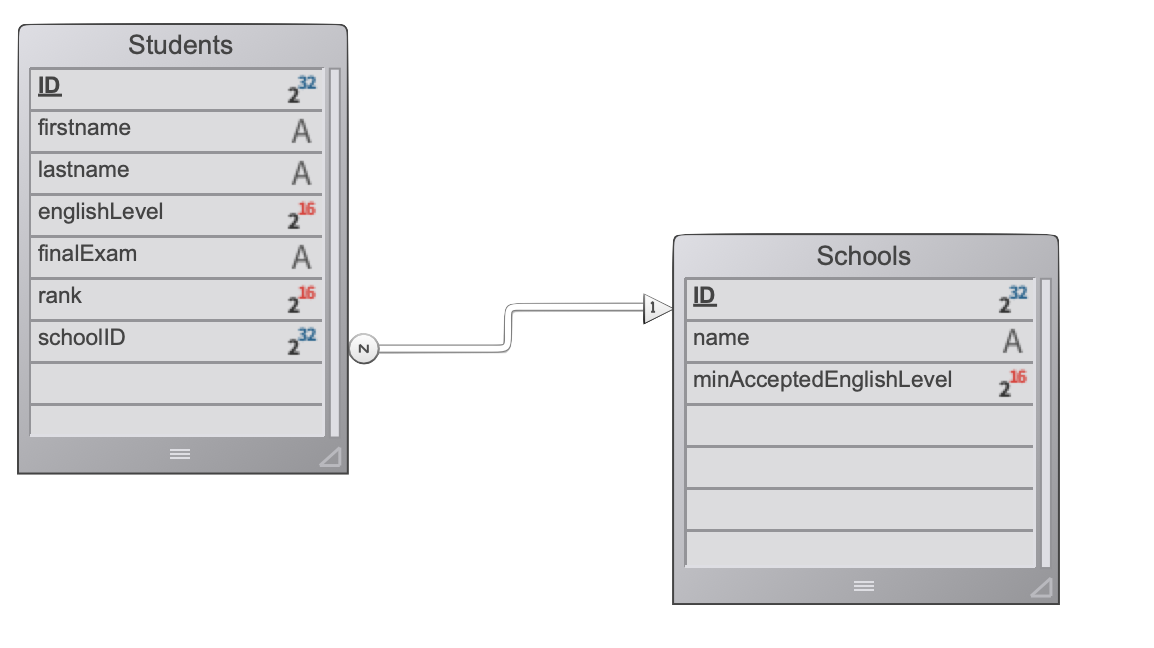
Let’s take a look at a concrete example. Here’s the data model we’ll use:
This class is used to implement functions related to the datastore.
The following is the DataStore class implementation.
We have a getDescription() function returning general information about the datastore.
Class extends DataStoreImplementation

Function getDescription

C_TEXT($0)

$0:="Learning system covering "+String(This.Students.all().length)+" students"
And here is the code calling the function:
C_TEXT($dbName)

$dbName:=ds.getDescription() // $dbName is "Learning system covering 200 students"
Because the datastore object returned by the ds command is an instance of the DataStore class, we can use it to call the getName() function.
This class is used to implement functions related to the dataclass.
The following is the Schools class implementation. We have a registerStudent() function to create a new student in a school.
It receives a student’s data in an object and checks if the student’s English level meets the school’s minimum required level. If everything is OK, the function creates and saves the Students entity.
There’s no need to worry about the data model implementation, simply build your object and call the function.
Class extends DataClass


Function registerStudent


 C_OBJECT($1;$data;$student;$school;$result;$0)


 $data:=$1


 $school:=ds.Schools.query("name = :1";$data.schoolName).first()

 $result:=New object("success";True)


 If ($data.englishLevel < $school.minAcceptedEnglishLevel)

   $result.success:=False

   $result.statusText:="The level of English is not high enough"

   $0:=$result

 End if


 If($result.success)

   $student:=ds.Students.new()

   $student.fromObject($data)

   $student.school:=$school

   $result:=$student.save()

   $0:=$student

 End if
And here’s the code calling the function:
Form.result:=ds.Schools.registerStudent(Form.data)

 //Form.data is

// {"englishLevel":4,"firstname":"Mary","lastname":"Smith","schoolName":"Math school"}
Because the ds.Schools dataclass object is an instance of the Schools class, we can use it to call the registerStudent() function.
This class is used to implement functions related to an entity.
The following is the implementation of the StudentsEntity class.
We have a getFirstAhead() function returning the students who have a better ranking than the current student.
Class extends Entity


Function getFirstAhead

 C_OBJECT($0;$ahead)

 C_LONGINT($1;$sliceSize)


 $sliceSize:=$1


 //Get the $sliceSize Students having a better rank

 $ahead:=This.getDataClass().query("rank < :1";This.rank).orderBy("rank desc")

 $0:=$ahead.slice(0;$sliceSize)
Here is the code calling the function:
C_OBJECT($student;$ahead)


$student:=ds.Students.query("lastname= :1";"Smith").first()


$ahead:=$student.getFirstAhead(3)

//$ahead is an entity selection (Students) containing the three Students ahead the student Smith
Because the $student entity object is an instance of the StudentsEntity class, we can use it to call the getFirstAhead() function.
Note that the StudentsEntity class extends the Entity class which contains all of the member methods available on an entity object (e.g., getDataClass(), etc.). Therefore those member methods can be called with This in the function.
This class is used to implement functions related to an entity selection.
The following is the implementation of the StudentsSelection class.
We have a setFinalExam() function updating an entity selection of students. The finalExam attribute is set to the value given.
Class extends EntitySelection


Function setFinalExam

C_TEXT($1;$value)

 C_OBJECT($0;$status;$student)

 $value:=$1


 For each ($student;This) Until (Not($status.success))

   $student.finalExam:=$value

   $status:=$student.save()

 End for each


$0:=$status
And here is the code calling the function:
C_OBJECT($result)

$result:=ds.Students.all().setFinalExam("Passed")

// All the students have their finalExam attribute set to "Passed"
Because the ds.Students.all() entity selection object is an instance of StudentsSelection class, we can use it to call the setFinalExam() function.
Another blog post is coming soon to explain how to call functions of ORDA classes in REST requests. Stay tuned!
In the meantime, download the HDI to start discovering the new ORDA classes and check out the documentation for more details!
Got a question, suggestion or just want to get in touch with the 4D bloggers? Drop us a line!
* Your privacy is very important to us. Please click here to view our Policy
Comments are not currently available for this post.