4D Blog

Home Product Great news! The image settings dialog is here

Great news! The image settings dialog is here

October 7, 2021

Product

Images are an essential part of documents. On an invoice for example, getting the right positioning for the company logo is important. That’s why the 4D Write Pro interface component offers a property dialog for images. You or your end users can easily define:

  • the size of the image
  • the display format
  • the margins and padding
  • the position on the page for anchored images


quickly Resize, Position, and Format a picture

Thanks to the new Picture settings dialog, you can modify the properties of pictures in a 4D Write Pro document at any time. These properties are related to the position, dimensions, and display mode of the picture. The available properties depend on the inserted picture (in the text flow or on the page). This dialog is available for both the sidebar and toolbar widgets.

Here is how it looks for an image anchored in the page:
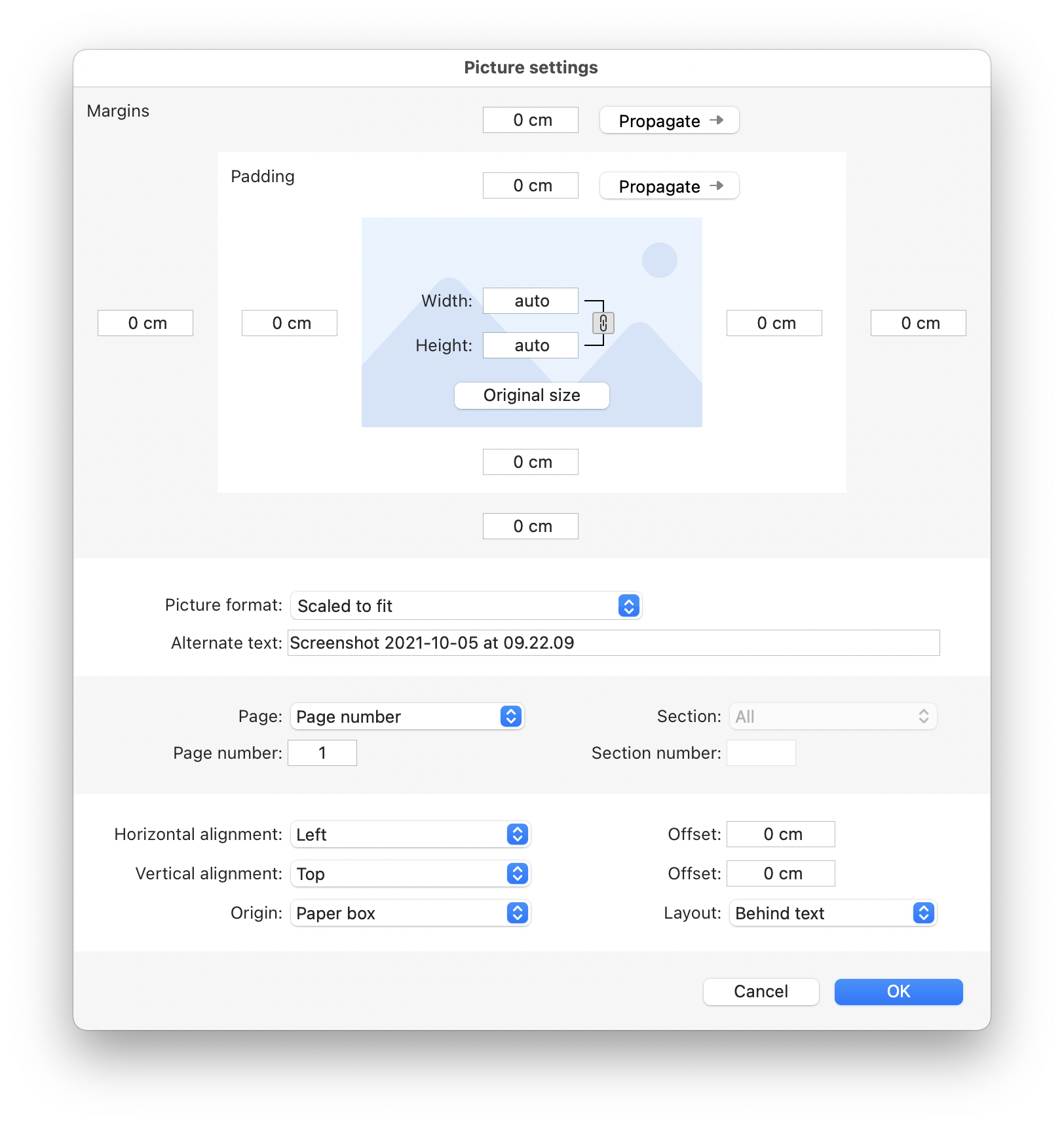
If you want to display this dialog from your contextual menu or from an event like “on double click” on the form, just use the “WP PictureSettings” component method.

$range:=WP Selection range(*; "WParea")
WP PictureSettings($range)

easily Insert all types of images

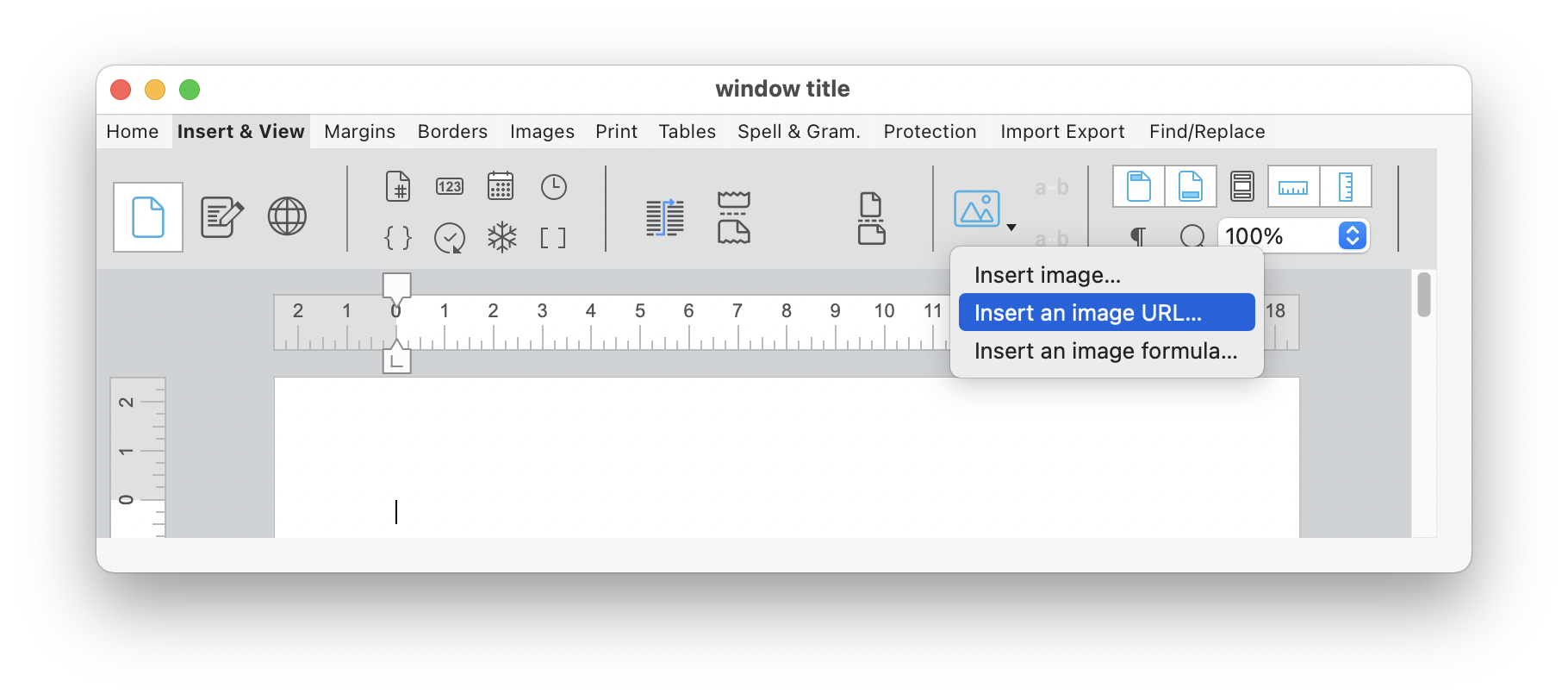
While working on the image properties, we noticed that you could not add an image from a URL with the toolbar widget. This oversight is fixed with 4D v19 R3.

To simplify and combine the three different images types, the button for inserting an image from the disk now displays a menu for inserting an image from the disk, with a URL or formula.
blank

Don’t forget, the source code is available on GitHub. Feel free to adapt it to your needs!

Discuss

Tags 4D Write Pro, Pictures, UI, v19 R3, v20

Latest related posts

  • February 3, 2026

    4D Write Pro – Adding a margin automatically when bullets are set using standard actions

  • January 22, 2026

    Transform Static Documents into Actionable Knowledge with AIKit

  • January 22, 2026

    Deploy Fluent UI effortlessly in your 4D applications

Vanessa Talbot
Vanessa Talbot
• Product Owner •Vanessa Talbot joined 4D Program team in June, 2014. As a Product Owner, she is in charge of writing the user stories then translating it to functional specifications. Her role is also to make sure that the feature implementation delivered is meeting the customer need.Since her arrival, she has worked to define key features in 4D. She has worked on most of preemptive multi-threading new features and also on a very complex subject: the new architecture for engined application. Vanessa has a degree from Telecom Saint-Etienne. She began her career at the Criminal Research Institute as a developer for the audiovisual department. She has also worked in media and medical fields as expert in technical support, production as well as documenting new features.
  • Deutsch
  • Français
  • English
  • Português
  • Čeština
  • Español
  • Italiano
  • 日本語

Categories

Browse categories

  • 4D View Pro
  • AI
  • 4D Write Pro
  • Email, Microsoft 365, Gmail
  • Development Mode
  • 4D Language
  • ORDA
  • User Interface / GUI
  • 4D Qodly Pro
  • Server
  • Maintenance
  • Deployment
  • 4D Tutorials
  • Generic
  • 4D Summit sessions and other online videos

Tags

4D AIKit 4D for Android 4D for iOS 4D NetKit 4D Qodly Pro 4D View Pro 4D Write Pro 21 21 R2 Administration AI Artificial Intelligence Build application CI/CD Class Client/Server Code editor Collections Formula Google Listbox Logs Mail Microsoft 365 Network Objects OpenAI ORDA PDF Pictures Preemptive Programming REST Scalability Security Session Source control Speed Spreadsheet Tutorial UI User Experience vscode Web Word processor

Tags

4D AIKit 4D for Android 4D for iOS 4D NetKit 4D Qodly Pro 4D View Pro 4D Write Pro 21 21 R2 Administration AI Artificial Intelligence Build application CI/CD Class Client/Server Code editor Collections Formula Google Listbox Logs Mail Microsoft 365 Network Objects OpenAI ORDA PDF Pictures Preemptive Programming REST Scalability Security Session Source control Speed Spreadsheet Tutorial UI User Experience vscode Web Word processor
Subscribe to 4D Newsletter

© 2026 4D SAS - All rights reserved
Terms & Conditions | Legal Notices | Data Policy | Cookie Policy | Contact us | Write for us


Subscribe to 4D Newsletter

* Your privacy is very important to us. Please click here to view our Policy

Contact us

Got a question, suggestion or just want to get in touch with the 4D bloggers? Drop us a line!

* Your privacy is very important to us. Please click here to view our Policy