4D Blog

Home Product 4D Write Pro – Elevate your documents’ layout with linked paragraphs

4D Write Pro – Elevate your documents’ layout with linked paragraphs

April 26, 2022

Product

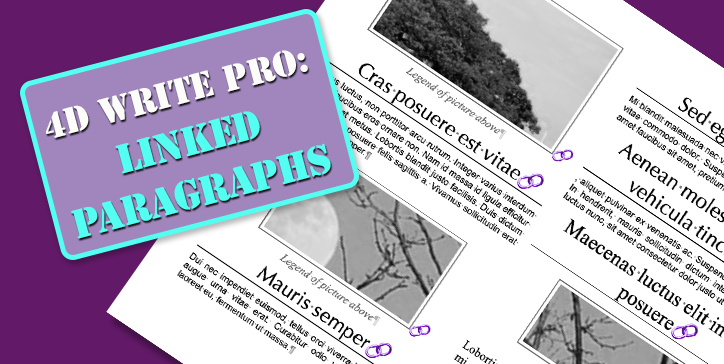
The layout of documents is a vital topic in many businesses, and there are many parameters to consider. To have even more precise control over the appearance of documents, it is now possible to link paragraphs together.

Link paragraphs in 4D Write Pro documents

Rules

Some rules are already known and applied in 4D Write Pro, such as managing “widows and orphans,” “unbreakable paragraphs,” etc.
Today and starting with 4D v19 R5, it is also possible to determine if a paragraph and the one that follows it must remain linked, i.e. not be separated by a page or column break.

Some examples

The simplest example is that of a title followed by content. The title is on one or two lines, and the following article, which can be much longer than the title, can be spread over several pages or columns. The critical thing, in this case, is that the title is not separated from the beginning of the article. If several “blocks” of this type are linked, they can follow the same rules and follow each other harmoniously.

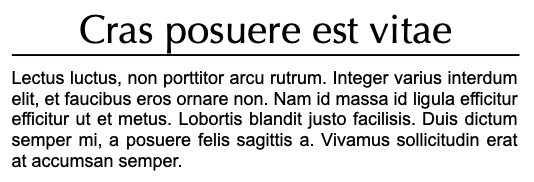
Title and article

No break between title and article!

Picture and caption

The other example that comes to mind is an image with a caption. The caption must remain under the image and, in no case, be rejected at the top of the page or the next column.

blank

In these two cases, the “keepWithNext” attribute, which is a paragraph attribute, should be assigned to the titles and the paragraphs containing the images.

What about style sheets?

As it is a paragraph attribute, a paragraph style sheet will, of course, be able to benefit from it too. This is even how it is recommended to use this attribute: Associating it directly to the style sheets!
All titles will be automatically linked to the paragraphs that follow them, and pictures will not lose their captions! What a time saver and easy to edit!

INTERFACE

Finally, both widgets (Toolbar and Sidebar) have been updated to set this new attribute to paragraph(s). Your end users will love it!

Sidebar

blank

Toolbar

blank


Need more adjustments? Don’t forget, the source code is available on GitHub. Feel free to adapt it to suit your needs!

Discuss

Tags 4D Write Pro, UI, v19 R5, v20, Word processor

Latest related posts

  • February 3, 2026

    4D Write Pro – Adding a margin automatically when bullets are set using standard actions

  • January 22, 2026

    Transform Static Documents into Actionable Knowledge with AIKit

  • January 22, 2026

    Deploy Fluent UI effortlessly in your 4D applications

Roland Lannuzel
Roland Lannuzel
• Product Owner & 4D Expert • After studying electronics, Roland went into industrial IT as a developer and consultant, building solutions for customers with a variety of databases and technologies. In the late 80’s he fell in love with 4D and has used it in writing business applications that include accounting, billing and email systems.Eventually joining the company in 1997, Roland’s valuable contributions include designing specifications, testing tools, demos as well as training and speaking to the 4D community at many conferences. He continues to actively shape the future of 4D by defining new features and database development tools.
  • Deutsch
  • Français
  • English
  • Português
  • Čeština
  • Español
  • Italiano
  • 日本語

Categories

Browse categories

  • AI
  • Release infos
  • 4D View Pro
  • 4D Write Pro
  • Email, Microsoft 365, Gmail
  • Development Mode
  • 4D Language
  • ORDA
  • User Interface / GUI
  • 4D Qodly Pro
  • Server
  • Maintenance
  • Deployment
  • 4D Tutorials
  • Generic
  • 4D Summit sessions and other online videos

Tags

4D-Analyzer 4D AIKit 4D for Android 4D for iOS 4D NetKit 4D Qodly Pro 4D View Pro 4D Write Pro 21 21 R2 Administration AI Artificial Intelligence Build application Class Client/Server Code editor Collections Compatibility settings Formula Google Listbox Logs Mail Network Objects OpenAI ORDA PDF Pictures Preemptive Programming REST Scalability Security Session Source control Speed Spreadsheet Tutorial UI User Experience vscode Web Word processor

Tags

4D-Analyzer 4D AIKit 4D for Android 4D for iOS 4D NetKit 4D Qodly Pro 4D View Pro 4D Write Pro 21 21 R2 Administration AI Artificial Intelligence Build application Class Client/Server Code editor Collections Compatibility settings Formula Google Listbox Logs Mail Network Objects OpenAI ORDA PDF Pictures Preemptive Programming REST Scalability Security Session Source control Speed Spreadsheet Tutorial UI User Experience vscode Web Word processor
Subscribe to 4D Newsletter

© 2026 4D SAS - All rights reserved
Terms & Conditions | Legal Notices | Data Policy | Cookie Policy | Contact us | Write for us


Subscribe to 4D Newsletter

* Your privacy is very important to us. Please click here to view our Policy

Contact us

Got a question, suggestion or just want to get in touch with the 4D bloggers? Drop us a line!

* Your privacy is very important to us. Please click here to view our Policy