4D Blog

Home Product 4D Write Pro: Disable Visibility of Empty Images

4D Write Pro: Disable Visibility of Empty Images

July 15, 2022

Product

4D Write Pro documents can contain images from different sources and in various formats. These images may, in some cases, not be displayed for totally reasonable reasons — such as invalid URLs, formulas returning empty images, formats not supported by the platform, etc.

However, they are always represented by a small empty rectangle showing their theoretical location. If you want to change this behavior, 4D v19 R6 is shipped with a new view option enabling you to make empty images completely invisible.

HDI: The New View Option in Action

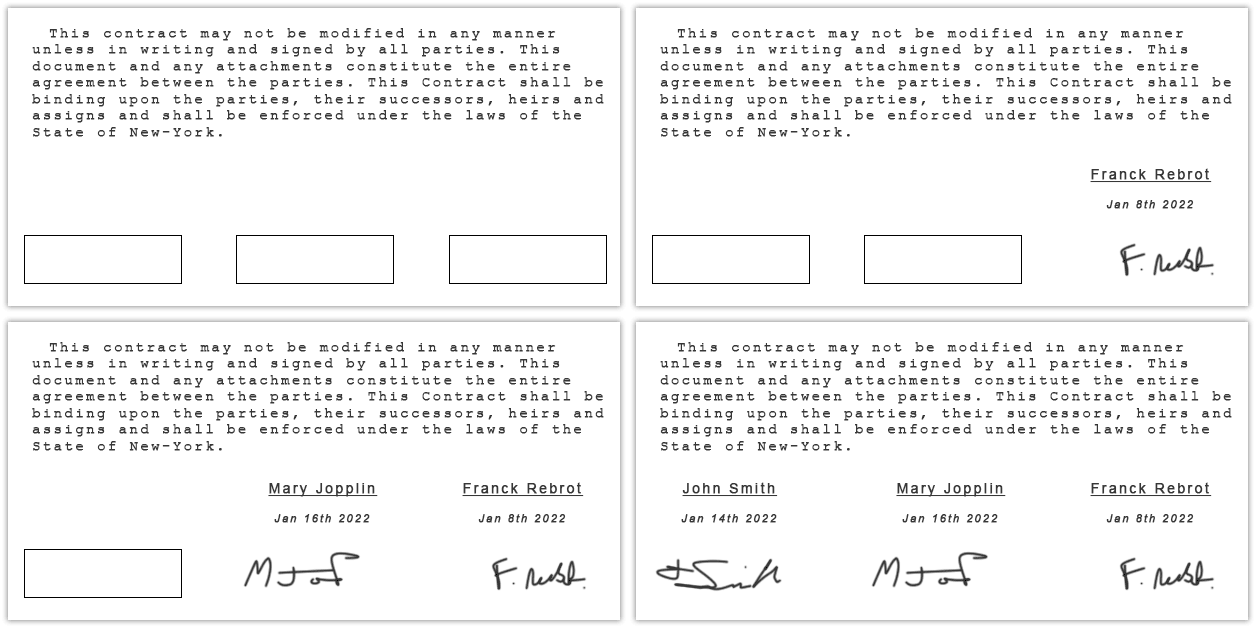
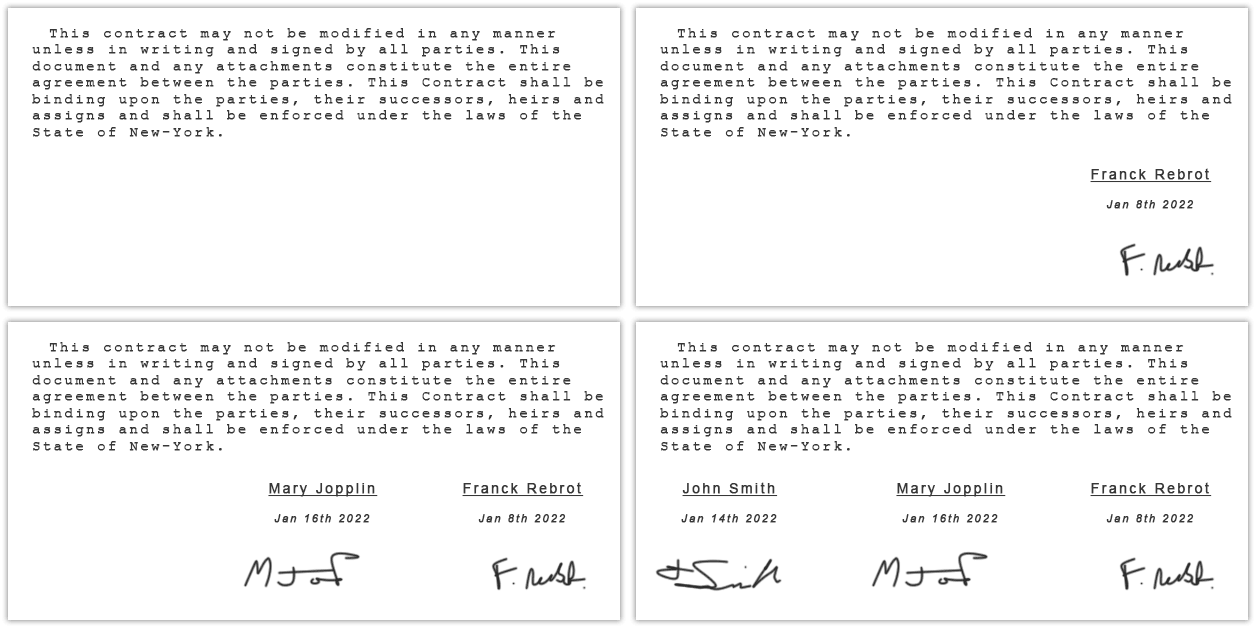
With and without setting the new property

Visible empty images 🙁


Hidden empty images 🙂
blank


wk VISIBLE empty images

This new property is a view property like the ruler display or the zoom factor. It is never stored in the document. Furthermore, it only applies when the formulas are executed, i.e., when the document is displayed in “values” mode and not in “formulas” mode, the latter remains visible.
Finally, for compatibility reasons, this new property is set to “true” by default, i.e., empty images remain represented by an empty rectangle.

Three ways to proceed

The choice between these display modes can be made in several different ways. Choose whatever suits you best:

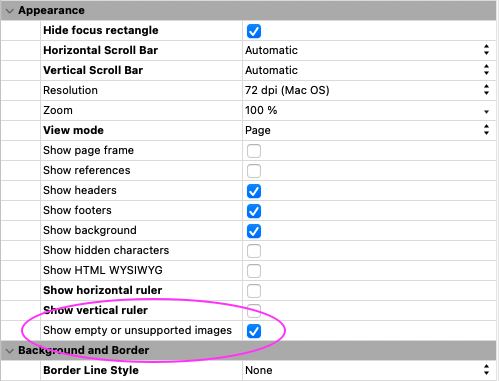
Via the property list

The first and most straightforward way is to use the property list, which offers a new entry in the appearance theme. The concerned form object will automatically take this choice into account.
 

blank

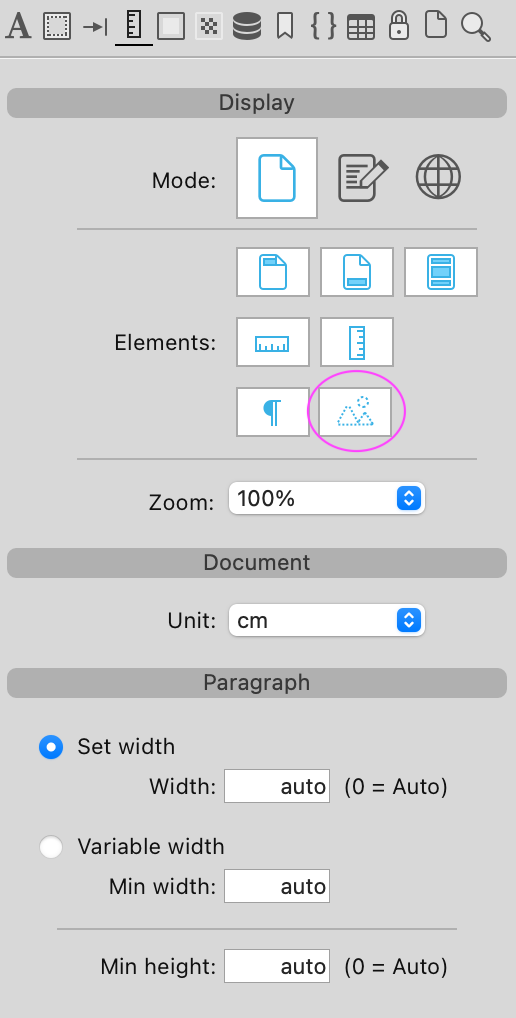
Via the user interface

The second choice is to use the user interface in which a new element appears. Either in the toolbar or in the sidebar.

blank

blank

Via programming

Finally, this can also be done by programming in one line of code:

WP SET VIEW PROPERTIES(*; "WParea"; New object(wk visible empty images; False))

Once this code is executed, the empty and unsupported images will be effectively hidden.

pdf, Docx, and SVG exports

The wk visible empty images parameter can also be used in a different context for exports. Indeed, why would you not wish to avoid exporting images when they are empty? Well, it is now possible to use this option when exporting!

many ways to do so (again):

This can be determined through the interface dialogs that precede the export…
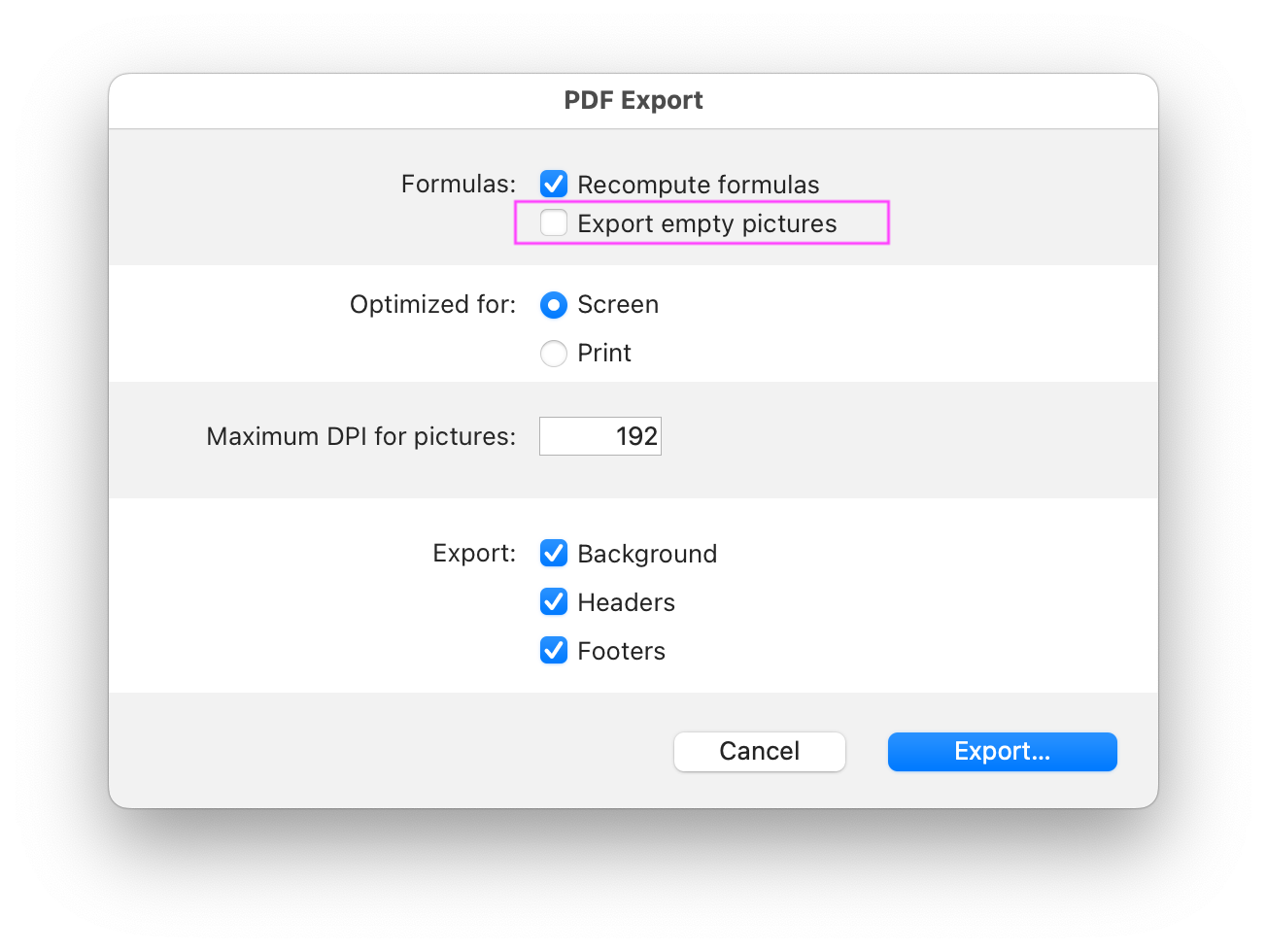
blank

… or programmatically by adding this new option to the object passed as a parameter

$o:=New object(wk visible empty images; False)
WP EXPORT DOCUMENT(WParea; $path; wk pdf; $o)

Conclusion

This new option will make it easy to set how documents should be displayed and/or exported. Either effortlessly via the user interfaces or by programming for even more precision and control.


More details on the documentation center. And as always, feel free to get in touch on the 4D Forums.


Discuss

Tags 4D Write Pro, Export, Pictures, v19 R6, v20, Word processor

Latest related posts

  • January 9, 2026

    Session handling in 4D Qodly Pro

  • January 7, 2026

    Enhance your Desktop Interface with Web widgets using 4D Qodly Pro

  • January 7, 2026

    Embed Qodly pages in a 4D web area without extra cost

Roland Lannuzel
Roland Lannuzel
• Product Owner & 4D Expert • After studying electronics, Roland went into industrial IT as a developer and consultant, building solutions for customers with a variety of databases and technologies. In the late 80’s he fell in love with 4D and has used it in writing business applications that include accounting, billing and email systems.Eventually joining the company in 1997, Roland’s valuable contributions include designing specifications, testing tools, demos as well as training and speaking to the 4D community at many conferences. He continues to actively shape the future of 4D by defining new features and database development tools.
  • Deutsch
  • Français
  • English
  • Português
  • Čeština
  • Español
  • Italiano
  • 日本語

Categories

Browse categories

  • AI
  • 4D View Pro
  • 4D Write Pro
  • 4D for Mobile
  • Email
  • Development Mode
  • 4D Language
  • ORDA
  • User Interface / GUI
  • Qodly Studio
  • Server
  • Maintenance
  • Deployment
  • 4D Tutorials
  • Generic
  • 4D Summit sessions and other online videos

Tags

4D AIKit 4D for Android 4D for iOS 4D NetKit 4D Qodly Pro 4D View Pro 4D Write Pro 20 R10 21 Administration AI Artificial Intelligence Build application CI/CD Class Client/Server Code editor Collections Formula Google Listbox Logs Mail Microsoft 365 Network Objects OpenAI ORDA PDF Pictures Preemptive Programming REST Scalability Security Session Source control Speed Spreadsheet Tutorial UI User Experience vscode Web Word processor

Tags

4D AIKit 4D for Android 4D for iOS 4D NetKit 4D Qodly Pro 4D View Pro 4D Write Pro 20 R10 21 Administration AI Artificial Intelligence Build application CI/CD Class Client/Server Code editor Collections Formula Google Listbox Logs Mail Microsoft 365 Network Objects OpenAI ORDA PDF Pictures Preemptive Programming REST Scalability Security Session Source control Speed Spreadsheet Tutorial UI User Experience vscode Web Word processor
Subscribe to 4D Newsletter

© 2026 4D SAS - All rights reserved
Terms & Conditions | Legal Notices | Data Policy | Cookie Policy | Contact us | Write for us


Subscribe to 4D Newsletter

* Your privacy is very important to us. Please click here to view our Policy

Contact us

Got a question, suggestion or just want to get in touch with the 4D bloggers? Drop us a line!

* Your privacy is very important to us. Please click here to view our Policy