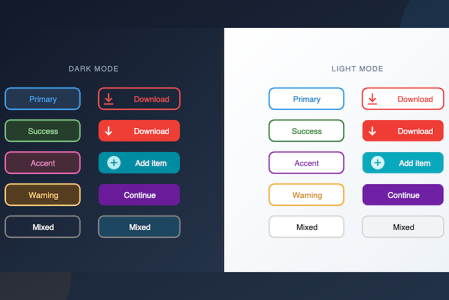
Customize Buttons, Radio Buttons, and Check Boxes with Background and Border Properties
Imagine you're building a toolbar with colorful action buttons, or a settings panel with styled radio buttons and check boxes. You don't need custom a...

The 4D language allows you to develop outstanding business applications. Many of you have taken the initiative to create tools that streamline specifi...
During the development phase, early detection of syntax errors is important for producing quality code. Real-time code checking is a valuable aid to d...
To allow you to make the most beautiful interfaces, we continue to improve the form objects. Since 4D v19 R6, you can define a rounded border for stat...
by Add Komoncharoensiri, Director of Technical Services at 4D Inc Here we go with another set of tips and tricks. As you know, 4D Knowle...
by guest author Michael Höhne, 4D developer (Munich, Germany) There's a feature in 4D v18 R5 that may have been overlooked, or at least ...
4D 18 R5 introduced form macros. They can be incredibly useful, for example, by providing an ideal way to save time on repetitive tasks. In this blog ...
4D v18 R5 provides a new 4D command to open a form in the form editor. This can be especially useful for analysis or introspection tools. ...
If you're a fan of macros in the code editor, then 4D v18 R5 has some good news for you ... because now macros are also available in the form editor!...
In 4D v18 R5, you can preview the final CSS rendering in the form editor WITHOUT running your dialog. Yes, you heard that right. Standardizing and rev...
Got a question, suggestion or just want to get in touch with the 4D bloggers? Drop us a line!
* Your privacy is very important to us. Please click here to view our Policy