4D Blog

Home Product Embed deployment license automatically into your applications

Embed deployment license automatically into your applications

July 18, 2025

Product Business user selecting a licensing interface, symbolizing 4D 20 R10’s new automatic deployment license integration feature for simplified application builds.

You’ve built the app. Now you need to ship it — fast, clean, and licensed. With 4D 20 R10, you can automatically embed your deployment license into your application builds — no manual setup, no machine-specific paths. Built for OEM and 4D Desktop – Business Edition licenses, this feature relies on just one setting to make your build file portable, version-controlled, and shareable across machines. License checks now run before the build starts, the logs show which licenses were used, and your settings stay intact if anything goes wrong.
One simple tweak, and deployment becomes one less thing to worry about.

Automatically embed your deployment licenses

Starting with 4D 20 R10, if you have deployment licenses registered on your machine, 4D can now automatically include them in your built applications.
To make things even easier, we’ve redesigned the license section of the Build Application dialog. It now offers a clear set of options to help you choose the type of application you want to build.

Application without embedded license

Screenshot of 4D 20 R10 Build Application dialog showing the 'Application without embedded license' option selected for deployment setup.

This is the default option for new projects, when the BuildApp.4DSettings file doesn’t contain any license information and Evaluation mode is disabled.
With this option, the built application won’t include any license. You’ll need to register the appropriate licenses on the deployed machines, as explained in this blog post.
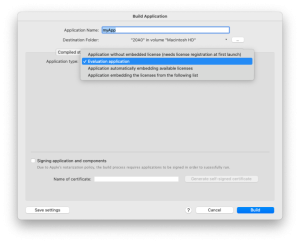
Evaluation application

4D 20 R10 Build Application window with 'Evaluation application' selected as the deployment option for testing or demo builds.

This option lets you build evaluation applications, as described in this blog post.
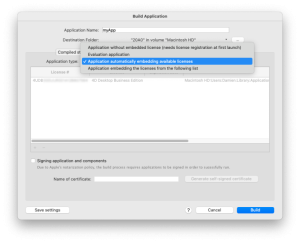
Application with automatically embedded licenses

4D 20 R10 Build Application dialog with 'Application automatically embedding available licenses' selected, showing dynamic license detection for deployment.

When you select this mode, 4D will automatically search your system’s Licenses folder for valid deployment licenses. The retrieved licenses are listed in the interface (refer to the documentation to check the license selection order). However, the license paths are not stored in the BuildApp.4DSettings file. Instead, a new boolean key — “BuildApp / Licenses / AutomaticLicenseIntegration” — has been introduced to enable this automatic integration.
With this setting, since no specific license path is defined in the file, the BuildApp.4DSettings file can be included in your version control repository or easily shared across multiple machines!
The automatic parameter has also been added to the Build4D component to support the same behavior: just define “License Automatic mode” in the “License” attribute of the settings object.
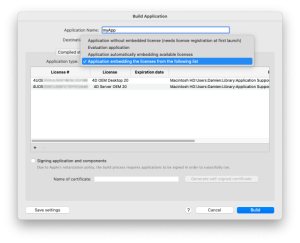
Application with defined embedded licenses

4D 20 R10 Build Application screen with 'Application embedding the licenses from the following list' selected, showing manually defined license inclusion.

This mode mirrors the previous behavior of the build process. The built application will include the licenses explicitly defined in the BuildApp.4DSettings file.

A smoother process for developers

To further improve the developer experience, we’ve made several enhancements to the build process:
  • License validity is now checked before the build starts, so you won’t have to wait until the end to discover any license-related issues. That’s a real time-saver.
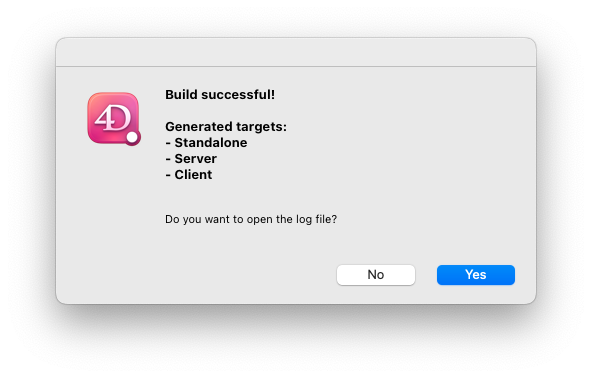
  • From the Build Application dialog, a new dialog now shows which targets were successfully generated at the end of the build. This information is also logged in the build log file, which now includes the licenses used.
  • When the build throws errors, the Build Application dialog remains open to prevent losing your most recent settings.
  • The Create deployment license command also benefits from the new automatic license integration.

4D 20 R10 dialog confirming successful build with generated targets for Standalone, Server, and Client applications, offering to open the log file.


We hope these improvements will save you time and make your deployment process even smoother.

Discuss

Tags 20 R10, 21, Build application, Build4D, Deployment

Latest related posts

  • December 3, 2025

    Give AI to a 30 years old 4D application

  • November 28, 2025

    ORDA – Handle an event-driven logic during database operations

  • November 27, 2025

    ORDA – Permissions – Restrict / allow web access to the resources in one click

Avatar
Damien Fuzeau
- Product Owner - Damien Fuzeau joined the 4D Product team in February 2019. As a Product Owner, he is responsible for writing user stories and translating them into functional specifications. His role also involves ensuring that the delivered feature implementations meet customer needs. Damien holds a degree in Software Engineering from the University of Nantes. He spent over 23 years at his previous company, first as a developer (discovering 4D in 1997), and later as Engineering Manager and Software Architect. The company was an OEM partner of 4D and deployed enterprise software based on 4D for thousands of users across hundreds of servers. Damien is therefore well-versed in 4D development and deployment in multilingual environments.
  • Deutsch
  • Français
  • English
  • Português
  • Čeština
  • Español
  • Italiano
  • 日本語

Categories

Browse categories

  • 4D View Pro
  • AI
  • 4D Write Pro
  • 4D for Mobile
  • Email
  • Development Mode
  • 4D Language
  • ORDA
  • User Interface / GUI
  • Qodly Studio
  • Server
  • Maintenance
  • Deployment
  • 4D Tutorials
  • Generic
  • 4D Summit sessions and other online videos

Tags

4D-Analyzer 4D AIKit 4D for Android 4D for iOS 4D NetKit 4D Qodly Pro 4D View Pro 4D Write Pro 20 R10 21 Administration AI Artificial Intelligence Build application Class Client/Server Code editor Collections Formula Listbox Logs Mail Microsoft 365 Network Objects OpenAI ORDA PDF Pictures Preemptive Programming REST Scalability Security Session Source control Speed Spreadsheet Tutorial UI User Experience v20 vscode Web Word processor

Tags

4D-Analyzer 4D AIKit 4D for Android 4D for iOS 4D NetKit 4D Qodly Pro 4D View Pro 4D Write Pro 20 R10 21 Administration AI Artificial Intelligence Build application Class Client/Server Code editor Collections Formula Listbox Logs Mail Microsoft 365 Network Objects OpenAI ORDA PDF Pictures Preemptive Programming REST Scalability Security Session Source control Speed Spreadsheet Tutorial UI User Experience v20 vscode Web Word processor
Subscribe to 4D Newsletter

© 2025 4D SAS - All rights reserved
Terms & Conditions | Legal Notices | Data Policy | Cookie Policy | Contact us | Write for us


Subscribe to 4D Newsletter

* Your privacy is very important to us. Please click here to view our Policy

Contact us

Got a question, suggestion or just want to get in touch with the 4D bloggers? Drop us a line!

* Your privacy is very important to us. Please click here to view our Policy