
Deploy Fluent UI effortlessly in your 4D applications

January 22, 2026
5 min read

With 4D 21 R2, Fluent UI remains in Developer Preview, but reaches a new milestone with a full native integration directly into 4D. While still in preview, it is now easier to enable, configure, and deploy, and no longer relies on external dependencies. Your applications instantly adopt a modern interface consistent with Windows 11, without any additional setup for your users.
And for you as a developer, the improvement is even more significant. Fluent UI becomes easier to activate, more flexible to configure, and simpler to deploy. You gain new tools and options that fit naturally into your workflow while offering a smooth and controlled transition to the new interface.
Fluent UI is now part of 4D itself, built directly into the product. There is no longer any complex setup or external framework to manage.
When installing 4D 21 R2 on the developer machine, 4D may suggest downloading the Windows App SDK, which is required to enable Fluent UI during development.
If the Windows App SDK is already present on the machine, this installation step can be skipped. Starting with Windows 11 25H2, the Windows App SDK is installed or updated directly with the operating system.
In just a few minutes, the development environment is ready to use Fluent UI, with no additional configuration required.
This native integration also greatly simplifies how you deploy your applications.
With 4D 21 R2, you can decide whether the Windows App SDK should be embedded directly into the generated application. This choice determines how Fluent UI will behave on end-user machines, independently of the developer setup.
In the Build Application dialog, Fluent UI now appears in the list of optional modules. This is where you make the decision to include or exclude the SDK. It is enabled by default, but you can turn it off if your application must remain 100% classic. In all cases, deployment remains simple, with no external dependencies to manage and a perfectly smooth user experience.

When the application starts, if the system configuration does not allow Fluent UI to be activated, the application automatically falls back to classic mode. No error message is displayed, only a warning line is added to the diagnostic log. This ensures predictable, robust, and fully transparent behavior for your users.
4D 21 R2 expands the command Application info to give you clear feedback on the Fluent UI status in your application.
var $useFluentUI; $canUseFluentUI : Boolean

$useFluentUI:=Application info.useFluentUI

$canUseFluentUI:=Application info.canUseFluentUI
This allows you to know whether the application is actually using Fluent UI and whether the environment supports it. It is ideal for diagnostics and improving your logging or user support.
4D introduced CSS media queries with prefers-color-scheme to handle light and dark modes. With 4D 21 R2, the platform goes a step further with a new media query called form-theme, dedicated specifically to the appearance of the form (classic or Fluent UI).
This media query lets you apply styles based on the form’s theme:
@media (form-theme: win-classic) {
	...
}

@media (form-theme: fluent-ui) {
	@media (prefers-color-scheme: light) {
		...
	}
	@media (prefers-color-scheme: dark) {
		...
	}
}
This flexibility is especially valuable if you are gradually migrating your forms to Fluent UI. You can keep your existing styles for classic forms while progressively introducing new styles optimized for the new design. Each form can evolve independently, allowing a smooth transition without affecting the rest of your application.
The modernization of 4D dialogs has begun. The following commands now display windows in Fluent UI design when the database is configured for Fluent UI:
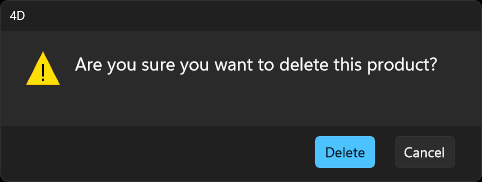
And that’s not all! The spell checker window now adopts the same look as the window that opened it.
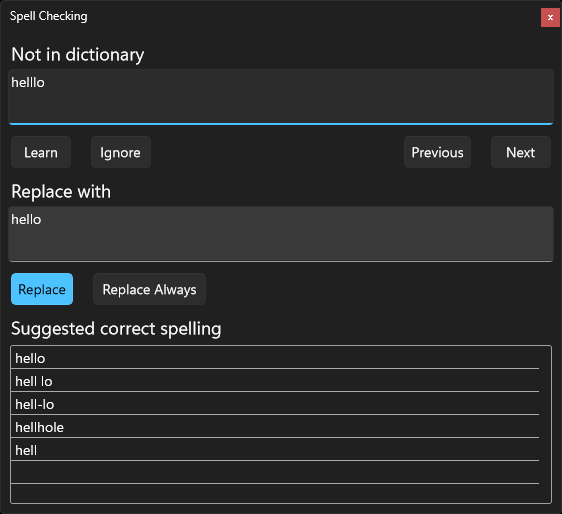
This gives your users a consistent and seamless experience throughout the entire application.
With 4D 21 R2, Fluent UI remains in Developer Preview while reaching a new level of native, platform-level integration. Activation is simpler, deployment is more flexible, CSS capabilities are expanded, and more dialogs now adopt a modern Fluent UI design.
This release provides developers with a solid and coherent foundation to explore, test, and progressively adopt Fluent UI in real-world applications, while preserving full compatibility with existing interfaces.
And best of all, you can move at your own pace, form by form, without breaking your existing interfaces. A smooth transition to Fluent UI, in the true spirit of 4D.
Got a question, suggestion or just want to get in touch with the 4D bloggers? Drop us a line!
* Your privacy is very important to us. Please click here to view our Policy
Comments are not currently available for this post.