
Touched event

July 16, 2025
5 min read

ORDA is a core long-term feature that opens up a world of new possibilities in 4D.
We keep enhancing ORDA to help you write powerful code. As a result, your apps become easier to develop and maintain — and most importantly, they are optimized for great performance for your end users.
That’s why we’re excited to introduce a new feature in 4D 20 R10: in-memory data events.
In a typical user journey, the required data by the user is loaded into memory, modified according to user actions, and finally saved when the user clicks a Save button.
What if you could automatically trigger business logic when in-memory data changes? It’s now possible to format or prepare data as early as possible, so it’s ready to save when needed.
This is made possible by the new ORDA touched event on data — and the benefits are considerable.
Want to learn more? Keep reading!
ORDA already covers so many aspects detailed in this blog post. The ORDA abstraction layer is more powerful than ever — It can now react to any change made to data in memory.
Remember: with ORDA, data is handled through entities loaded into memory via a read action (such as a query).
The 4D 20 R10 introduces the concept of entity-level events. The touched event is the first in a coming series—and because it has no equivalent in classic 4D code, it’s worth adopting.
The touched event lets you centralize business logic code that runs when an entity’s attribute values change in memory.
During a user journey, you can now respond to in-memory data changes with custom business logic — and even update what’s shown to the user in real time.
When working with an entity, you can focus on a specific attribute and trigger code when its value changes.
Here are a few use cases where this is especially useful:
Automatically uppercase or capitalize user input
Propagate updates to related attributes in the same data model
In the example below, a People entity is updated. The title is truncated to its first six characters.The lastname and city attributes are converted to uppercase.

Before, you needed to handle events like On losing focus on each form object and repeat code in many different places.
Now, touched events can be implemented for specific attributes using to the touched and event keywords. The logic is centralized in the appropriate Entity class and is triggered any time the attribute value changes — anywhere in the application.
In this example, a touched event has been implemented for some attributes in the PeopleEntity class:
Class extends Entity

Function event touched title($event : Object)
	This.title:=Substring(This.title; 1; 6)

Function event touched lastname($event : Object)
	This.lastname:=Uppercase(This.lastname)

Function event touched city($event : Object)
This.city:=Uppercase(This.city)In this example, the touched event is used to avoid using a computed attribute, which may impact performance. In a Booking dataclass (used in a car rental application), you need to know if the departure and arrival dates are the same.
The implementation might look like:
exposed function get sameDay(): Boolean
return (This.departureDate = This. arrivalDate)
However, querying on this attribute can’t use indexes, so it’s not optimized.
Instead, define a physical sameDay attribute in the dataclass and keep it updated using the touched event for the departureDate and arrivalDate attributes:
Function event touched departureDate($event : Object)
	This.sameDay:=(This.departureDate=This.arrivalDate)

Function event touched arrivalDate($event : Object)
This.sameDay:=(This.departureDate=This.arrivalDate)Need to react to any data change during the user journey? Whether it’s for debugging or live updates, you can now trigger a touched event at the entity level. When any attribute of the entity changes, the event is triggered and gives you useful info.
In the Entity class, define a touched event function that receives the event as an Object parameter.
For example, here is the PeopleEntity class.
Class extends Entity

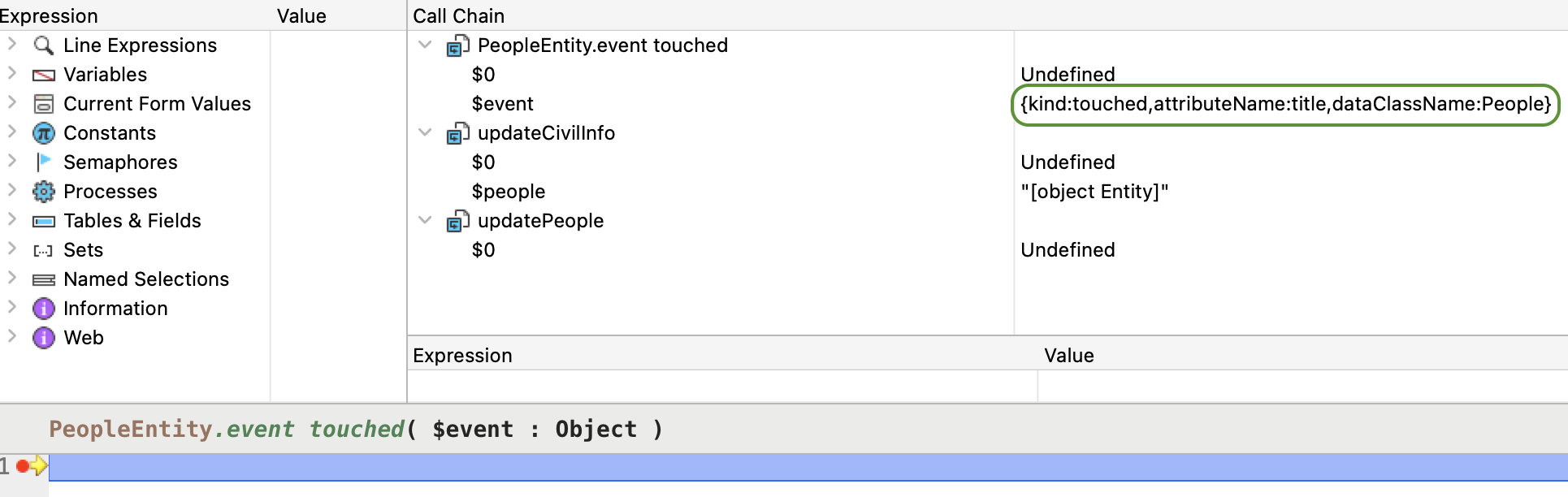
Function event touched($event : Object)You suspect a People entity is being updated somewhere in your app, but don’t know where. Just implement the touched event and place a breakpoint inside to trace the call chain.
Here is a simple updatePeople project method:
$people:=ds.People.all().first()

updateCivilInfo($people)

updateAddress($people)
In the debug window, you’ll see the method (updateCivilInfo) that triggered the event. The touched event object even contains the attribute name that changed:
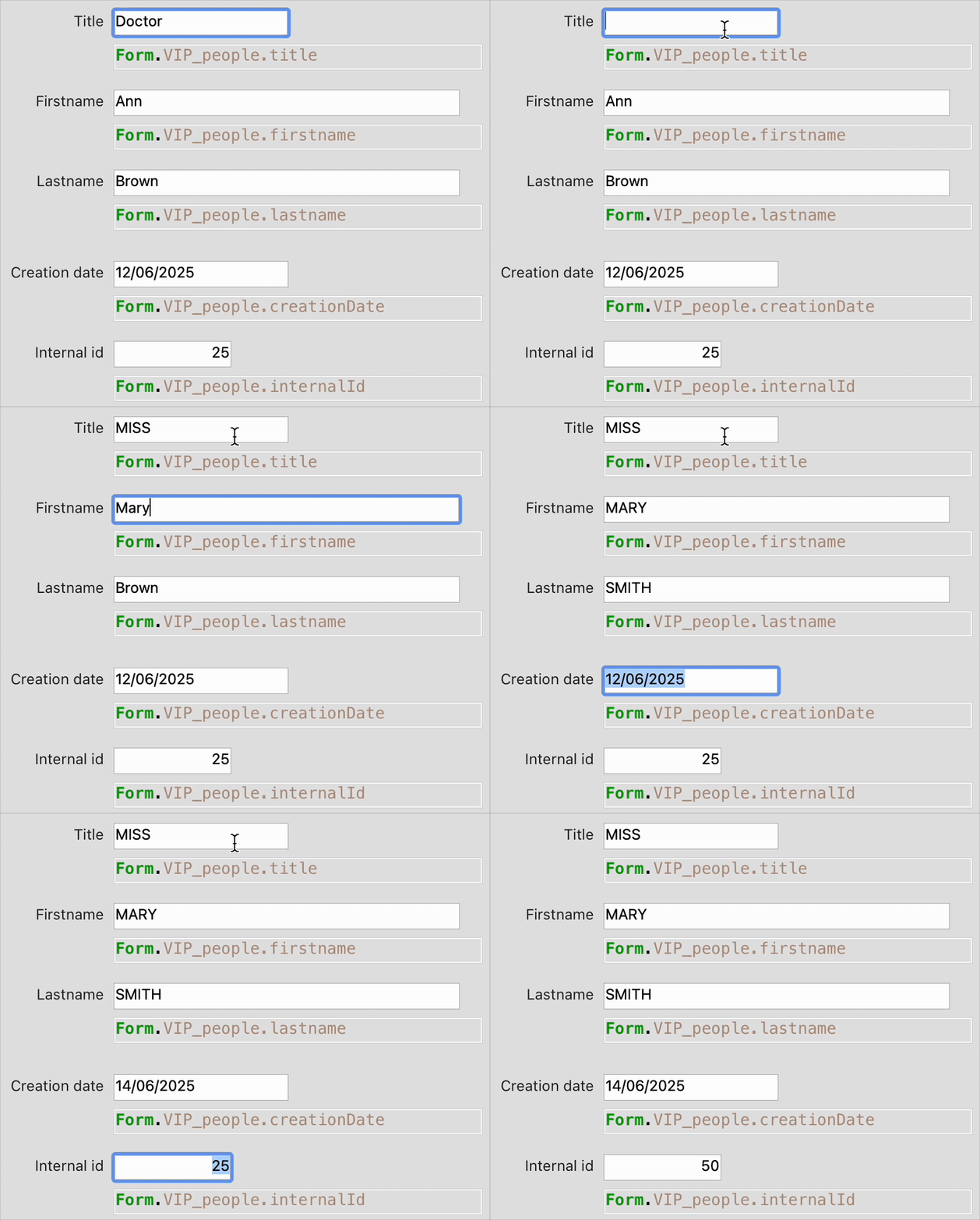
You want to automatically uppercase any attribute—regardless of name—as long as it’s a Text type.
Just implement this:
Class extends Entity

Function event touched($event : Object)

	If (Value type(This[$event.attributeName])=Is text)
		This[$event.attributeName]:=Uppercase(This[$event.attributeName])
	End if
And it works across your app:
As you can imagine, the touched event is likely to be triggered frequently — so the code you write inside it should be lightweight and fast to avoid performance issues. The example above is best suited for dataclasses with a small number of attributes.
If you want to understand how this event behaves in client/server setup, in 4D Qodly pro, or when using a remote datastore, check out this blogpost (coming soon).
Also, don’t forget to explore the documentation and try out the HDI demo to learn more.
Got a question, suggestion or just want to get in touch with the 4D bloggers? Drop us a line!
* Your privacy is very important to us. Please click here to view our Policy
Comments are not currently available for this post.