
When Qodly.com Meets 4D Server, What Are They Talking About?

June 24, 2024
4 min read

Last September, 4D unveiled Qodly Studio for 4D, offering comprehensive benefits that enable you to seamlessly create dynamic, efficient business web applications. If you haven’t yet, check out this blog post to learn how to get started with Qodly Studio for 4D.
Qodly Studio is also accessible on qodly.com, forming a part of 4D’s new SaaS offering.
Excitingly, the synergy between Qodly.com and 4D applications reaches new heights with the introduction of the QodlyScript openDatastore command. This feature enables qodly.com web applications to seamlessly connect with 4D applications deployed on 4D Servers, facilitating the utilization of 4D projects as remote datastores. So, if you’re eager to harness the power of your 4D application data and business logic within a qodly.com environment, you’ll be delighted to learn about the possibilities offered by Qodly Studio’s latest advancements.
Now, picture this scenario: your existing 4D Server-based application serves both desktop and web clients using Qodly forms. If this setup mirrors your current approach, feel free to skip ahead.
But if you want to extend your existing 4D server-based application with a totally new one, only web-based – and this one hosted on Qodly.com then this post is for you and shows how to communicate between both.
Note: The following code uses QodlyScript, a language inspired by JavaScript and 4D. It looks similar to 4D but is not precisely identical.
Let’s say we develop an HR web application on qodly.com: Qodly-HR. We already have some business logic coded in a 4D project: 4D-HR. Instead of rewriting this logic in QodlyScript, we will call it with the openDatastore command!
This simple example handles employees’ hourly rates depending on the country they work in. Employees’ hourly rates are not the same regardless of where they work.
Here is the model in Qodly-HR:
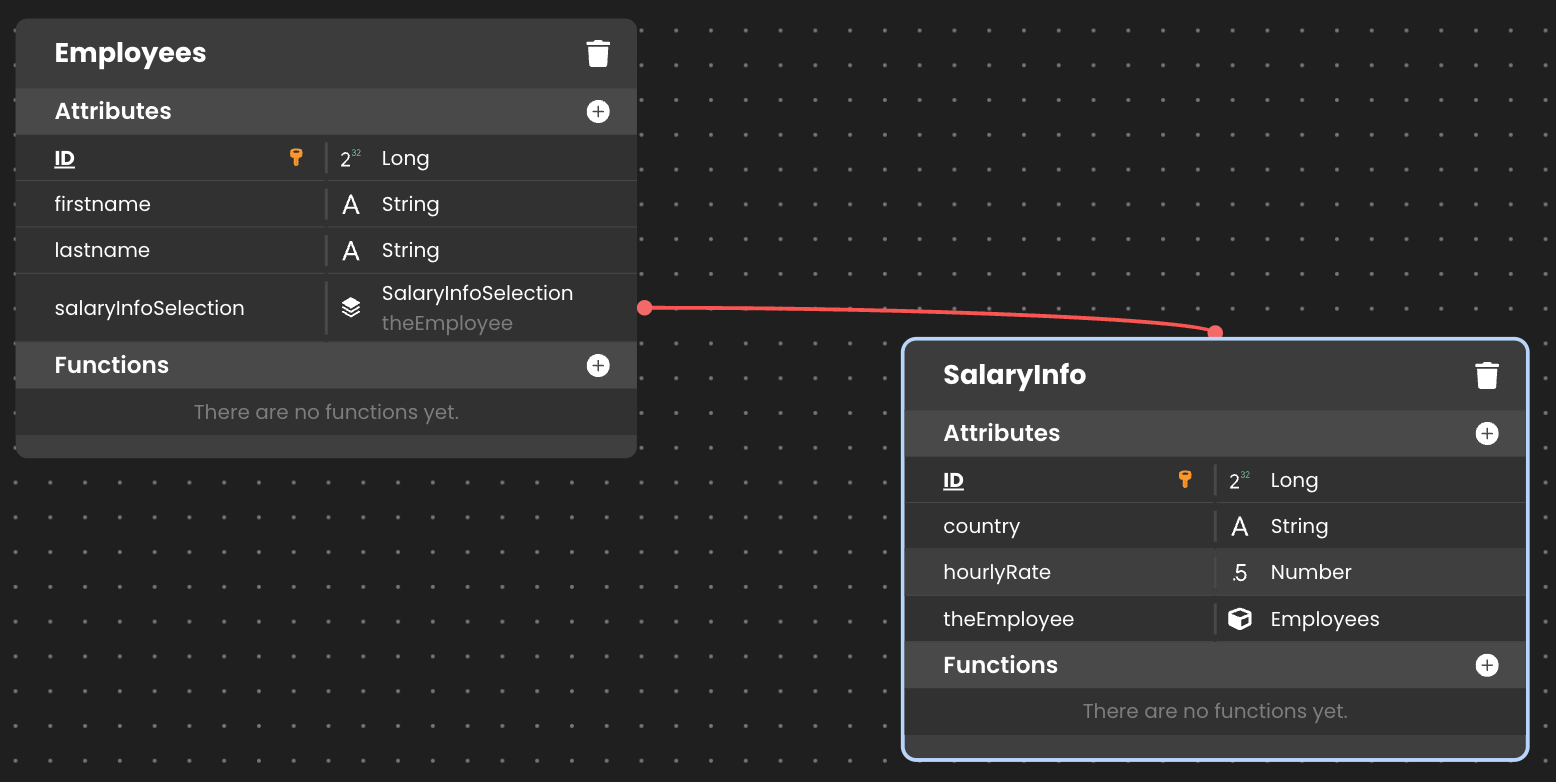
In Qodly-HR, we create employees. But to compute their hourly rates, we’ll rely on 4D-HR’s already existing business logic. Indeed, a function computeHourlyRates is available in 4D-HR to do so: it takes an hourly rate in a given country as an input parameter and returns a collection of rates per country.
The QodlyScript code snippet below is used to create an employee in Qodly-HR. In this code, we call our distant 4D-HR datastore function computeHourlyRates by providing a French hourly rate to retrieve UK and US hourly rates.
var employee: cs.EmployeesEntity

var salaryInfo : cs.SalaryInfoEntity

var salaries: collection

var info : object

var status: object


employee = ds.Employees.new()

employee.firstname="Mary"

employee.lastname="Smith"

status=employee.save()


salaries=ds.getHRDatastore().computeHourlyRates("FR", 100)

//salaries is [{country:FR,hourlyRate:100},{country:UK,hourlyRate:95},{country:US,hourlyRate:90}]


forEach(info,  salaries)

    salaryInfo=ds.SalaryInfo.new()

    salaryInfo.fromObject(info)

    salaryInfo.theEmployee=employee

    status=salaryInfo.save()

end
Here is the Datastore class:
extends DataStoreImplementation


exposed Function getHRDatastore() : 4D.DataStoreImplementation


var connect : object = {hostname: "hr@acme.com"}

var remoteDS : 4D.DataStoreImplementation


remoteDS = openDatastore(connect, "hr")


return remoteDS
We have another 4D project, 4D-Sales, to handle sales and customers. We use it in the same way as the 4D project, 4D-HR.
In the Datastore class, we have this function to use the 4D project 4D-Sales as a remote datastore:
exposed Function getSalesDatastore() : 4D.DataStoreImplementation


var connect : object = {hostname: "sales@acme.com"}

var remoteDS : 4D.DataStoreImplementation


remoteDS = openDatastore(connect, "sales")


return remoteDS
In our Qodly-HR web app, we need to get the customers whose total amount is greater than the average.
Here is how we handle this. We read all the customers on the 4D project: 4D-Sales and make our query.
var customers, targetCustomers: 4D.EntitySelection

var amountAverage : number


customers=ds.getSalesDatastore().Customer.all()


amountAverage=customers.average("totalAmount")


targetCustomers=customers.query("totalAmount >= :1", amountAverage)
That’s it!
Stay tuned to learn more about the connection between Qodly.com and the 4D Server.
Got a question, suggestion or just want to get in touch with the 4D bloggers? Drop us a line!
* Your privacy is very important to us. Please click here to view our Policy
Comments are not currently available for this post.