4D Blog

Home Tips How to create a generic form with dynamic forms

How to create a generic form with dynamic forms

May 22, 2018

Tips

Imagine that your database contains several tables of types or categories. These tables are very simple, often with only an identifier and a text field. For demonstration purposes, let’s say it’s a shoe management database. To qualify the products, we need to define their type, color, pattern, material, season and so on.

It’s cumbersome to manage each of these tables in a list form and an input form and associated methods. In this case, the use of a generic form is essential to avoid duplication and simplify maintenance.

And that’s where dynamic forms and JSON pointers are come in handy!

In this blog post, you’ll see one possible way to build generic forms.

Database example

With this database, you can open five different dialogs, as shown below. But if you go back to design mode, you’ll notice that you can’t find any forms in the 4D Explorer…
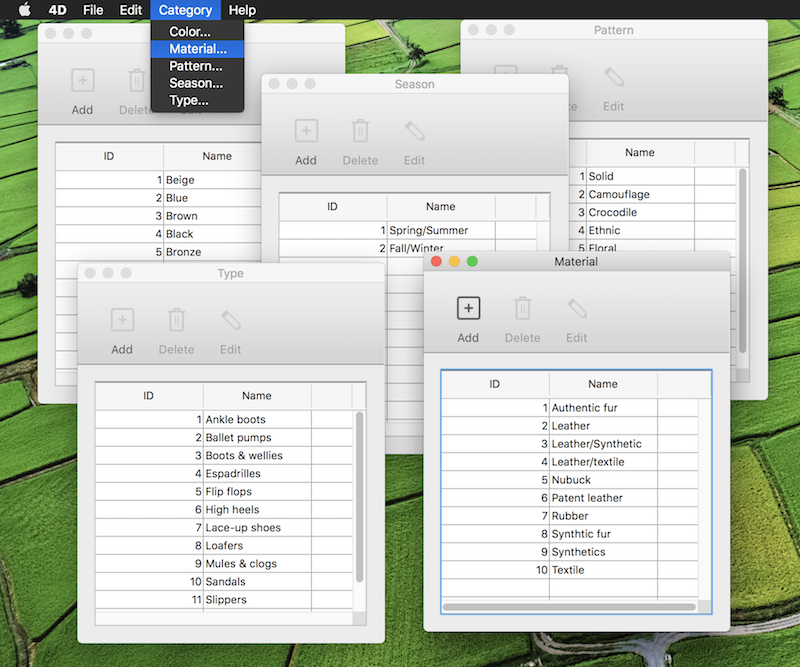
So, how are these forms created?

In the three steps described below:

1. First, we create a list form that we save in a JSON file. For the specific information on table and fields, we use JSON pointers. For example, let’s say we want to write the table name in the window title. In the dynamic form, we just have to enter:

"windowTitle": { "$ref": "#/info/table" }

Here’s another example, in the list box, we want to define the column data source, so we write:

"dataSource": { "$ref": "#/info/field1" }

2. Then, at runtime, when the user clicks on the menu item, we inject an object defining the table, with the fields the user has chosen.

C_OBJECT($o;$info)
$info:=New object("table";$table; "field1";"["+$table+"]"+"ID"; "field2";"["+$table+"]"+"Name")
$o:=JSON Parse(Document to text("RESOURCES/Form/CategoryOutputForm.json"))
$o.info:=$info

3. To open the form, nothing exceptional is required, just use the Open form window command. The only thing to remember is that 4D resolves the JSON pointers when calling the Open form window command:

$ref:=Open form window($o;Plain form window)

The same can be done with the input form. And now try it for yourself!

Discuss

Tags Dynamic forms, Objects, Programming, UI, v17

Latest related posts

  • September 15, 2025

    Find the right spot in your 4D Write Pro document with AI

  • September 2, 2025

    Intelligent 4D Write Pro document analysis with AI

  • August 25, 2025

    ORDA – Constructor and touched event – Detailed behaviour through a network

Vanessa Talbot
Vanessa Talbot
• Product Owner •Vanessa Talbot joined 4D Program team in June, 2014. As a Product Owner, she is in charge of writing the user stories then translating it to functional specifications. Her role is also to make sure that the feature implementation delivered is meeting the customer need.Since her arrival, she has worked to define key features in 4D. She has worked on most of preemptive multi-threading new features and also on a very complex subject: the new architecture for engined application. Vanessa has a degree from Telecom Saint-Etienne. She began her career at the Criminal Research Institute as a developer for the audiovisual department. She has also worked in media and medical fields as expert in technical support, production as well as documenting new features.
  • Deutsch
  • Français
  • English
  • Português
  • Čeština
  • Español
  • Italiano
  • 日本語

Categories

Browse categories

  • AI
  • 4D View Pro
  • 4D Write Pro
  • 4D for Mobile
  • Email
  • Development Mode
  • 4D Language
  • ORDA
  • User Interface / GUI
  • Qodly Studio
  • Server
  • Maintenance
  • Deployment
  • 4D Tutorials
  • Generic
  • 4D Summit sessions and other online videos

Tags

4D-Analyzer 4D AIKit 4D for Android 4D for iOS 4D NetKit 4D Qodly Pro 4D View Pro 4D Write Pro 20 R10 21 Administration AI Artificial Intelligence Build application Class Client/Server Code editor Collections Compatibility settings Formula Google Listbox Logs Mail Network Objects OpenAI ORDA PDF Pictures Preemptive Programming REST Scalability Security Session Source control Speed Spreadsheet Tutorial UI User Experience vscode Web Word processor

Tags

4D-Analyzer 4D AIKit 4D for Android 4D for iOS 4D NetKit 4D Qodly Pro 4D View Pro 4D Write Pro 20 R10 21 Administration AI Artificial Intelligence Build application Class Client/Server Code editor Collections Compatibility settings Formula Google Listbox Logs Mail Network Objects OpenAI ORDA PDF Pictures Preemptive Programming REST Scalability Security Session Source control Speed Spreadsheet Tutorial UI User Experience vscode Web Word processor
Subscribe to 4D Newsletter

© 2026 4D SAS - All rights reserved
Terms & Conditions | Legal Notices | Data Policy | Cookie Policy | Contact us | Write for us


Subscribe to 4D Newsletter

* Your privacy is very important to us. Please click here to view our Policy

Contact us

Got a question, suggestion or just want to get in touch with the 4D bloggers? Drop us a line!

* Your privacy is very important to us. Please click here to view our Policy