
Restrict data according to privileges or information saved in session storage

April 9, 2025
7 min read

In modern application development, securing and finely managing data access are essential. Thanks to the restrict event in 4D, it is possible to dynamically filter the data accessible to a user based on their profile, privileges, and session-stored information.
This blog explains how to leverage this event, particularly in the context of an integration with 4D Qodly Pro, to ensure that only relevant data is exposed.
Performance Review Application
The restrict event is an automatic filtering mechanism applied to the entities of a dataclass in ORDA. It is triggered to restrict query results (all(), query(), API REST access, etc.) based on a specific context (user info, privileges, etc.).
Key Benefits:
For more details, the official 4D documentation on entity filtering provides a comprehensive overview of this feature.
In 4D, access control is managed through privileges and restrictions, which work together to ensure secure and granular data access. Understanding the distinction between these two mechanisms is crucial for designing a robust security model.
A privilege determines whether a user is authorized to access a table, a field, or a function within the database. It acts as a high-level access control mechanism that grants or denies access to an entire dataset or feature.
Example Use Cases:
While privileges control access at a structural level, restrictions determine which specific records within an authorized table a user can see or interact with. The on restrict event dynamically filters data based on user context, ensuring that users only access relevant records while respecting predefined security rules.
Example Use Cases:
In this example, we implement the restrict event within the Employee dataclass to filter the returned list of employees. The following code illustrates how to use session information and privileges to determine data access:
Function event restrict() : cs.EmployeeSelection

var $obj : Object

If (Session=Null)

  $obj:=Storage

Else

  $obj:=Session.storage

End if

Case of

  : (Session.hasPrivilege("authentify"))

   return This.all()

  : (Session.hasPrivilege("generatePDF"))

   return This.all()

  : (Session.hasPrivilege("createReview"))

   return This.all()

  : (Session.hasPrivilege("webadmin"))

   return This.all()

  : ($obj.Employee.role="Collaborator")

   return This.query("ID = :1"; $obj.Employee.ID)

  : ($obj.Employee.role="Manager")

   return This.query("ID_Supervisor = :1"; $obj.Employee.ID)

  : (($obj.Employee.role="HR") && (Session.hasPrivilege("hr")))

   return This.all()

  Else

   return This.newSelection()

End case
How It Works
Note: The webadmin privilege is used by the Data Explorer in 4D. If you want your data to be accessible through the Data Explorer, you must handle the case for the webadmin privilege. In our example, we grant full access to the Data Explorer by returning This.all() when this privilege is present.
This second example demonstrates how to restrict access to reviews in the Review dataclass based on the user’s role.
Function event restrict() : cs.ReviewSelection

var $obj : Object

If (Session=Null)

  $obj:=Storage

Else

  $obj:=Session.storage

End if

If ($obj.Employee.role=Null)

  return Null

End if


Case of

  : (($obj.Employee.role="HR") && (Session.hasPrivilege("hr")))

   return This.all().orderBy("Date desc")


  : ($obj.Employee.role="Manager")

   return This.query("Employee.ID_Supervisor = :1"; $obj.Employee.ID).orderBy("Date desc")


  : ($obj.Employee.role="Collaborator")

   return This.query("ID_Employee = :1"; $obj.Employee.ID).orderBy("Date desc")


  : (Session.hasPrivilege("webadmin"))

   return This.all()


Else

  return This.newSelection()

End case
Using standard actions
In the collaborator page of the Qodly application, the user has the collaborator role, and can only consult his own reviews.
In Qodly Studio, we define the standard action All to fill the data table on the on load event of the collaborator page. Normally, the standard action All retrieves all reviews. But, as we’ve added the restrict event to the review dataclass. We only retrieve reviews authorized with the collaborator role.

Using custom functions
On the Manager page, users with the “Manager” role can view all reviews related to their subordinates. We add an advanced filtering feature to refine results by year and status.
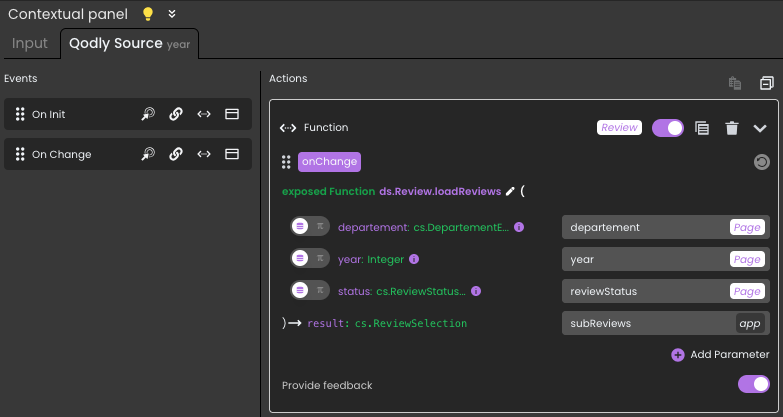
In the Review dataclass, we have the loadReviews function:
exposed Function loadReviews($departement : cs.DepartementEntity; $year : Integer; $status : cs.ReviewStatusEntity) : cs.ReviewSelection

Case of

  : (($departement=Null) && ($status=Null))

   return This.query("Date >= :1 AND Date <= :2"; String($year)+"/01/01"; String($year)+"/12/31")


  : (($departement#Null) && ($status=Null))

   return This.query("Employee.ID_Departement = :1 AND Date >= :2 AND Date <= :3"; $departement.ID; String($year)+"/01/01"; String($year)+"/12/31")


  : (($departement=Null) && ($status#Null))

   return This.query("ID_Status = :1 AND Date >= :2 AND Date <= :3"; $status.ID; String($year)+"/01/01"; String($year)+"/12/31")


  : (($departement#Null) && ($status#Null))

   return This.query("Employee.ID_Departement = :1 AND ID_Status = :2 AND Date >= :3 AND Date <= :4"; $departement.ID; $status.ID; String($year)+"/01/01"; String($year)+"/12/31")


Else

  return This.newSelection()

End case
In Qodly Studio, this function is triggered by the on data change event for the year and status data sources.
For year input:
For status select box:
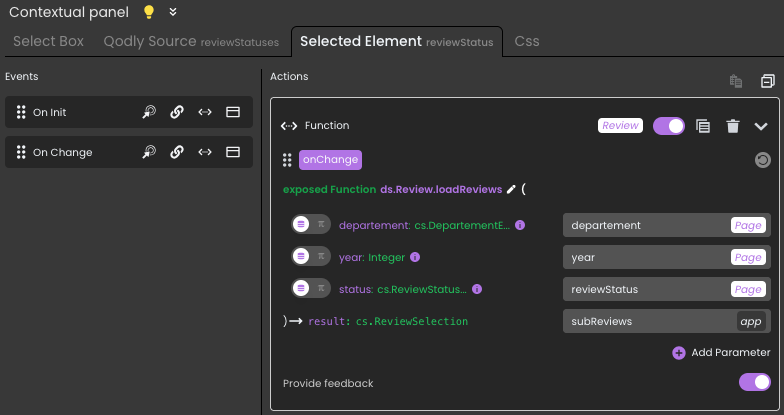
The customized filter is combined with the global restriction provided by on restrict, enabling you to refine your results while respecting the security rules defined in advance.
The restrict event in 4D proves to be a powerful tool for dynamically managing data access. By leveraging user privileges and session storage, it ensures granular access control without adding complexity to the business logic. Furthermore, integration with complementary mechanisms such as promote and the addition of custom filters provide increased flexibility to meet specific requirements.
To deepen your understanding of this topic, refer to the official documentation on ORDA entities as well as the 4D blog dedicated to data filtering.
Got a question, suggestion or just want to get in touch with the 4D bloggers? Drop us a line!
* Your privacy is very important to us. Please click here to view our Policy
Comments are not currently available for this post.