
Modernize your 4D interfaces with Fluent UI

October 21, 2025
4 min read

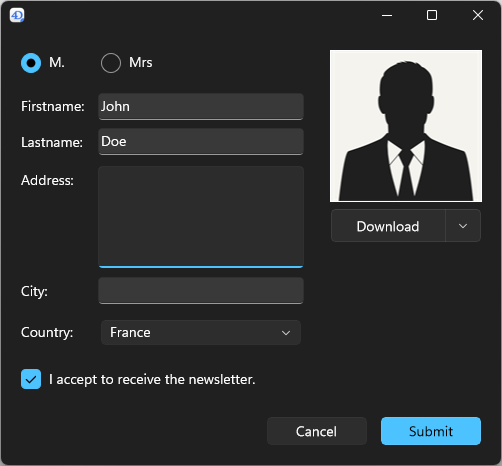
Behind the scenes, a significant engineering effort has been carried out to bring native Fluent UI integration into 4D. This means that 4D forms can now be displayed using Microsoft’s Fluent UI design system, the same modern visual style that defines Windows, Office, and Teams. 4D is one of the first development environments to offer native WinUI integration, allowing developers to bring the authentic Fluent UI experience to their desktop applications. On the client side, the transition couldn’t be simpler. All it takes is enabling Fluent UI rendering in your project settings and making a few minor layout adjustments in your forms to enjoy the new, modern look.
This deep integration marks one of the key evolutions in 4D 21, which introduces Fluent UI rendering as a new way to display your forms using Microsoft’s modern graphical interface. Until now, your forms were displayed using the familiar classic Windows style. Now, you can choose between the trusted classic look and the sleek Fluent UI style, aligning your app with modern user expectations. This flexibility allows you to adapt your applications to your users’ expectations, while keeping control over the pace at which you modernize your interfaces.
Fluent UI is available as a Developer Preview in 4D 21 Beta but it will not be included in the final release. However, developers will be able to continue testing and experimenting with this technology starting in 4D 21 R2.
Fluent UI is the design system that powers Microsoft applications such as Windows, Office, and Teams. Its goal is to deliver a consistent, elegant, and enjoyable visual experience.
According to the Fluent UI documentation, it is based on a few key principles:
In short, Fluent UI is not just a new appearance but a true design philosophy that makes applications more pleasant, modern, and intuitive.
For Windows desktop applications, Fluent UI is implemented through WinUI 3, which is part of the Windows App SDK.
This is the technology 4D now integrates, allowing you to bring a modern look with dark mode support to your forms while preserving the stability of your existing applications.
Light theme

Dark theme
First, you need to install the Windows App SDK version 1.7.3. If the SDK is not installed, 4D will automatically display the form using the classic style without generating errors.
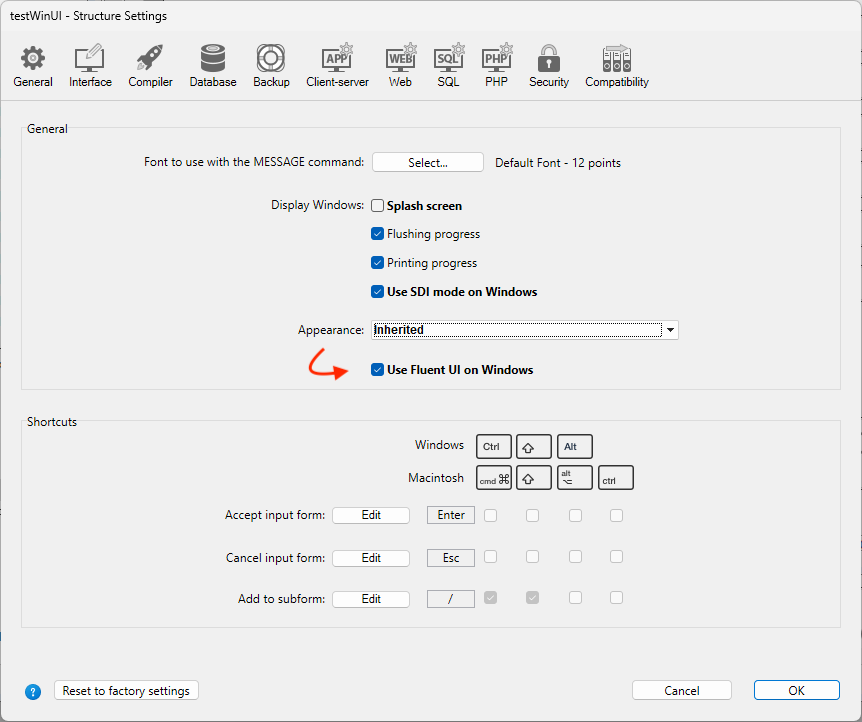
Next, you can define the global style of your application in the project settings. This option is ideal if you are ready to adopt WinUI across your entire project.
If you prefer a gradual transition, each form can override the global setting through the “Widget Appearance” property. The default option is “Inherited”, which follows the global application setting. You can also explicitly select Classic to keep the traditional rendering or Fluent UI to modernize a specific form that is ready.
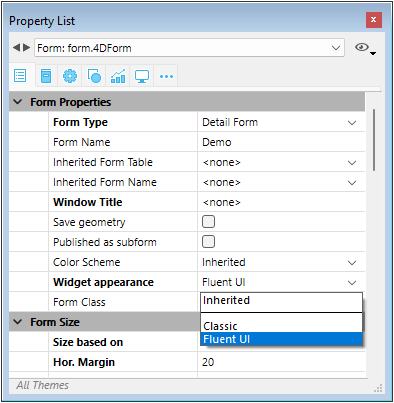
This means you stay in full control of the transition. You can switch your whole project at once if you are ready, or modernize step by step by enabling Fluent UI only on selected forms.
Some features are not yet supported when using Fluent UI rendering:
With the ability to switch between the classic Windows style and the Fluent UI style, 4D gives you even more freedom to design tailor-made interfaces. You can modernize your applications at your own pace, according to your priorities, while significantly improving the user experience. And that’s one of the things that makes 4D technology so powerful in the long run. You don’t need to start from scratch or face complex migrations. You can move to a modern UI library with only a fraction of the effort required by other desktop technologies.
Just a reminder: Fluent UI rendering is available as a Developer Preview in 4D 21 Beta but won’t be included in the final release. You will, however, be able to continue experimenting with it in 4D 21 R2.
Try out Fluent UI rendering in your 4D forms today, and don’t hesitate to share your results with the community on the forum!
Got a question, suggestion or just want to get in touch with the 4D bloggers? Drop us a line!
* Your privacy is very important to us. Please click here to view our Policy
Comments are not currently available for this post.