
Execute Code from Text with 4D.Method

April 27, 2026
2 min read

Business applications are constantly evolving, and new logic is often required even after deployment. In some cases, applications store business rules as text in the database or storage and execute them at runtime. To update them, developers may need to execute code that was not originally planned during development, especially in compiled or deployed environments. With 4D.Method, 4D 21 R3 allows you to create and execute methods dynamically from text, safely and efficiently.
The 4D.Method class lets you create a method dynamically from text. For example, if you need to update Storage attributes with new values while an application is already running, you can define the logic in a BusinessRules.4dm file containing the required code:
// BusinessRules.4dm file
var $newBusinessRules:=New shared object
Use ($newBusinessRules)
	$newBusinessRules.taxRate:=0.2
	$newBusinessRules.discountFormula:="price * quantity * discountRate"
	$newBusinessRules.approvalThreshold:=10000
	$newBusinessRules.freeShippingThreshold:=150
	$newBusinessRules.defaultCurrency:="EUR"
End use

Use (Storage)
	Storage.businessRules:=$newBusinessRules
End use
and then execute the code contained in that file using:
var $myFile:=File("/DATA/BusinessRules.4dm")

var $myMethod:=4D.Method.new($myFile.getText())
// Syntax errors verification
If ($myMethod.checkSyntax().success)
   $myMethod.call()
End if
No matter how your project is running, interpreted or compiled, the generated method is executed in interpreted mode.
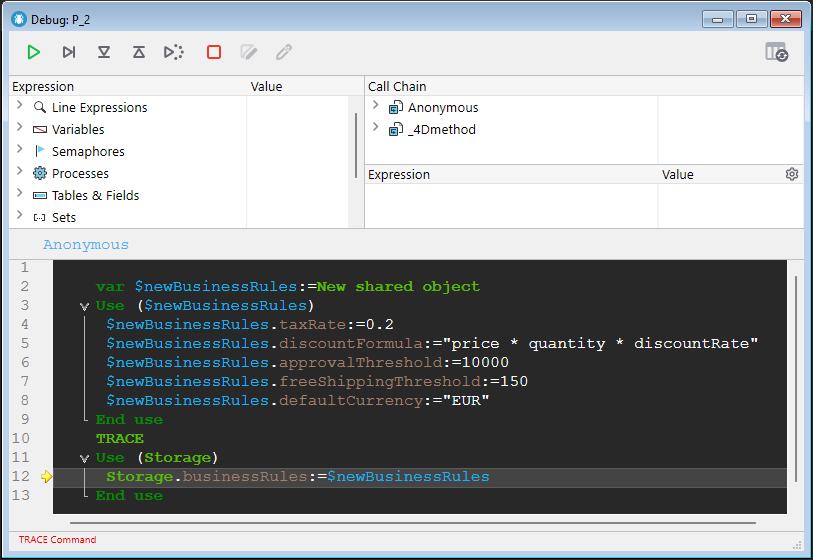
Because the dynamic code is interpreted, you can debug it just like a classic project method, even if your application is compiled. If an error occurs during execution, the debugger can be opened from the error window, and you can also insert a TRACE command in the source to explicitly trigger the debugger when needed:
// BusinessRules.4dm file
var $newBusinessRules:=New shared object
Use ($newBusinessRules)
	$newBusinessRules.taxRate:=0.2
	$newBusinessRules.discountFormula:="price * quantity * discountRate"
	$newBusinessRules.approvalThreshold:=10000
	$newBusinessRules.freeShippingThreshold:=150
	$newBusinessRules.defaultCurrency:="EUR"
End use
TRACE
Use (Storage)
	Storage.businessRules:=$newBusinessRules
End use
During execution, the debugger will open automatically:
4D.Method brings true runtime flexibility to your applications while keeping the safety and structure of the 4D language. You can generate, validate, debug, and execute logic dynamically, even in compiled or deployed environments. This opens the door to smarter maintenance, customizable business rules, and more adaptive applications.
Got a question, suggestion or just want to get in touch with the 4D bloggers? Drop us a line!
* Your privacy is very important to us. Please click here to view our Policy
Comments are not currently available for this post.