
Centralizing AI Providers information in 4D

May 7, 2026
3 min read

As AI becomes a core part of your applications, you increasingly rely on embeddings, vector similarity, and AI-driven features. One recurring challenge has been managing AI models and API keys in a clean, reusable, and secure way, while also allowing API keys to be updated without requiring a full rebuild.
To address this, 4D 21 R3 introduces AI Providers and Model Aliases, a unified approach to define, store, and reuse all your AI configurations, whether they come from local sources or internet-based services, in one place, and fully usable with AIKit.
A new AI tab is now available in the 4D settings when working in project mode, allowing you to create, modify, and delete AI providers.
AI Providers allow you to define all connection-related information in one place:
Each provider represents a connection to an AI provider, such as OpenAI or a compatible endpoint:
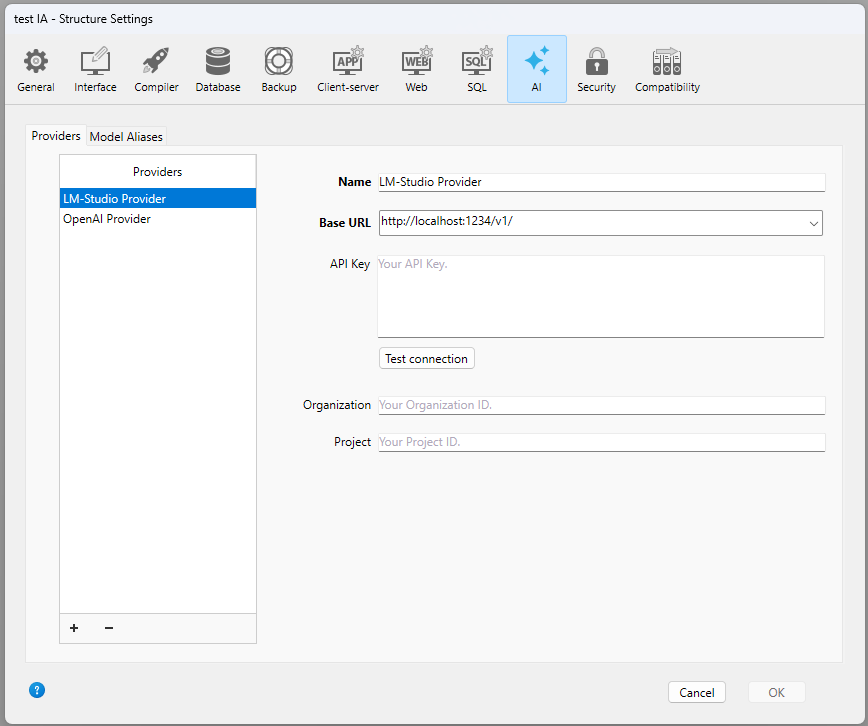
The provider configuration is stored in a JSON file named AIProviders.json located next to your setting.4DSetting file, depending on your deployment configuration.
While AI Providers centralize connection details, Model Aliases simplify how models are referenced in your code.
A model alias is a mapping between:
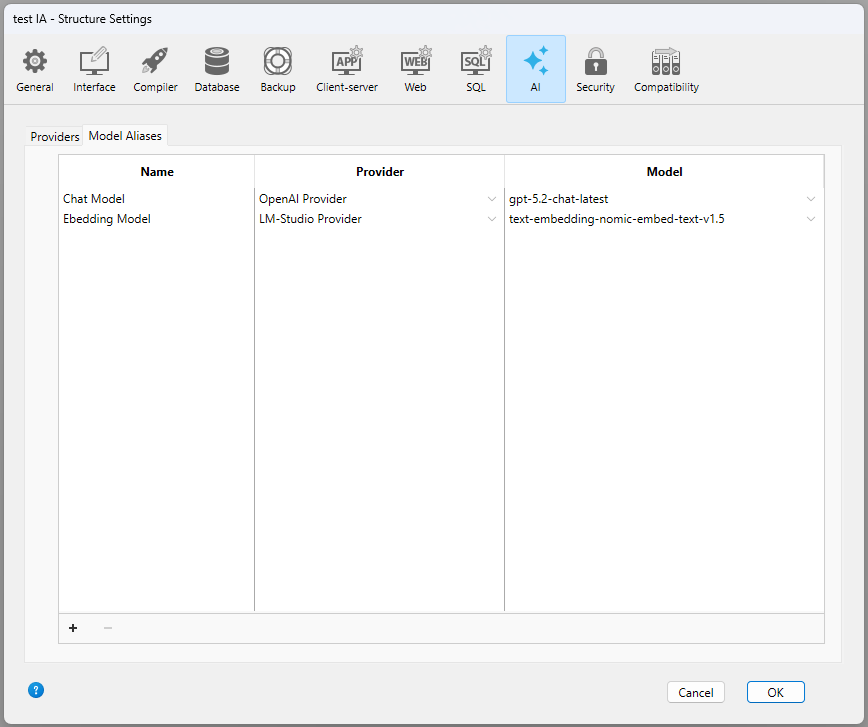
This allows you to avoid hardcoding model names, switch models without changing your code, and keep consistency across environments.
Once everything is configured in the UI, your code becomes significantly simpler and cleaner:
You can reference a model with the syntax: {model:”Modelname”}, where Modelname is a valid model defined in the Model Aliases tab:
var $client:=cs.AIKit.OpenAI.new()
var $result := $client.chat.completions.create($messages; \
    {model: "Chat Model"})
When using a model alias:
In addition to the UI, 4D AIKit provides a new class to access AI providers programmatically:
var $AIProviders:=cs.AIKit.OpenAIProviders.new()The OpenAIProviders.list() function returns a collection of all existing provider names, making it easy to build dynamic logic or validation workflows:
var $providers := $AIProviders.list()
// $providers=["LM-Studio Provider","OpenAI Provider"]
The OpenAIProviders.modelAliases() function returns a collection of all existing model aliases:
var $models := $AIProviders.modelAliases()
// $models=[{"name":"Chat Model","provider":"OpenAI Provider","model":"gpt-5.2-chat-latest"},...]By centralizing configuration in the UI and simplifying model usage in code, AI Providers and Model Aliases make it easier than ever to build robust and maintainable AI-powered applications in 4D.
Got a question, suggestion or just want to get in touch with the 4D bloggers? Drop us a line!
* Your privacy is very important to us. Please click here to view our Policy
Comments are not currently available for this post.