
Vector Indexing in 4D: Faster Similarity Search for 4D.Vector Fields

October 20, 2026
4 min read

Vector data is at the heart of modern AI-powered features: semantic search, recommendation engines, RAG (Retrieval-Augmented Generation) pipelines, and more. As 4D.Vector fields become a first-class citizen in 4D databases, the ability to index them efficiently is essential to keep queries fast as datasets grow. This post walks through how vector indexing works in 4D, what algorithms are supported, and how to manage vector indexes programmatically.
Querying a vector field typically means finding the records whose vectors are “closest” to a reference vector, using a similarity metric. Without an index, 4D has to scan every vector in the table and compute the distance one by one, which is correct but slow as the table grows.
With a vector index, 4D uses an algorithm purpose-built for vector similarity search, dramatically reducing query time while returning the same results as an unindexed query. In other words:
4D introduces three dedicated index types for 4D.Vector fields, in addition to the existing “Standard” index:
| Constant | Use Case |
|---|---|
Vector cosine index |
Similarity based on the angle between vectors |
Vector dot index |
Similarity based on the dot product |
Vector euclidean index |
Similarity based on straight-line distance |
These are available through CREATE INDEX and SET INDEX, and each index type can be selected independently, enabling a single vector field to have several indexes simultaneously (e.g., both Cosine and Euclidean).
Vector fields and their indexes are fully integrated into the Structure Editor and related dialogs:
 , both in the Structure Editor and in the Inspector.
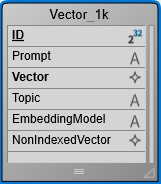
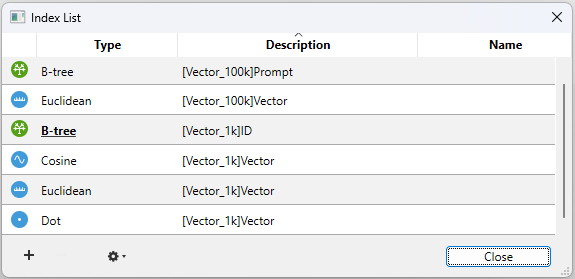
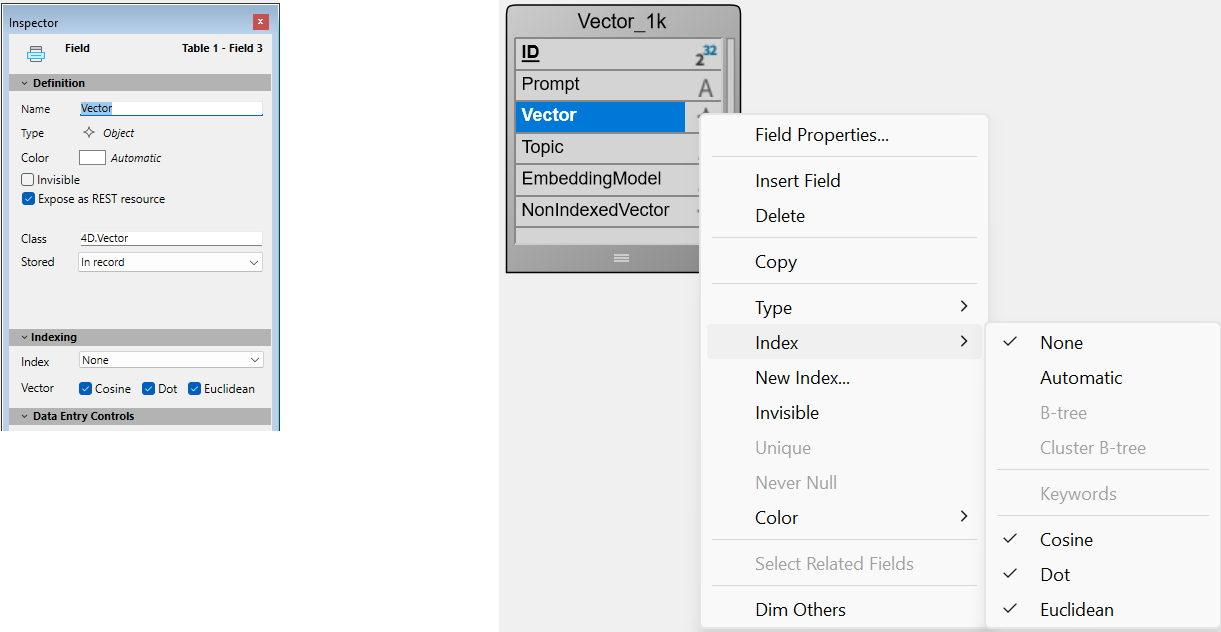
4D takes care of keeping vector indexes consistent with the data:
Keep in mind that:
Vector indexes are treated as first-class citizens across 4D’s maintenance and administration tools:
4D.Vector.new() now accepts a precision parameter, which can be 32 or 64 bits (mk single precision and mk double precision constants). By default, new vectors are created with 32-bit precision (4 bytes per component). This reduces the storage footprint by half compared to 64-bit vectors while retaining enough precision for similarity and distance calculations, which is why it is the recommended default for most use cases.
$vector32:=4D.Vector.new([1; 2; 3])
// $vector32.precision=32

$vector64:=4D.Vector.new([1; 2; 3]; mk double precision)
// $vector64.precision=64
Compatibility note: This change breaks compatibility with existing code that relied on the previous 64-bit default. To preserve 64-bit precision, pass mk double precision explicitly.
Vector indexing in 4D brings production-grade performance to similarity search directly inside the database engine, without sacrificing consistency or ease of use. Whether you’re building a recommendation system, a semantic search feature, or a RAG pipeline, you can now:
As always, indexed and non-indexed queries return identical results, the index is purely a performance optimization, never a behavioral change.
Got a question, suggestion or just want to get in touch with the 4D bloggers? Drop us a line!
* Your privacy is very important to us. Please click here to view our Policy
Comments are not currently available for this post.