
ORDA – Permissions – Restrict / allow web access to the resources in one click

November 27, 2025
4 min read

Discover here, how, in web processes, you can protect your resources (data + business logic) from malicious accesses and from unauthorized users … in one click.
In development mode, set the Restrict access by default property to FALSE to concentrate on your code organization, data model, Qodly pages architecture, tests … without any restriction to use data or to call functions.
When ready to implement user profiles, just set the Restrict access by default property to TRUE to ensure nobody will access your data and business logic without being explicitly authorized.
Since 4D 20, 4D provides a powerful and fully customizable system to protect the resources (data + business logic) from unauthorized users.
This system offers a customizable level of granularity and relies on the presence of privileges in the session. Privileges must be set up in the roles.json file and authorized to run some actions (Read, Create, …) on some resources (dataclasses, attributes, functions).
Privileges apply on web processes using scalable web sessions, e.g.: REST requests, remote datastores, Qodly apps.
When the user is granted to enter the application, the authentication implementation must put the appropriate privileges in the session.
Then, when the application receives a web request, a control is done regarding the presence of privileges in the session. Only authorized actions can be done.
A permission error is raised if the action on the resource is not permitted.
With 4D21, new boolean property is available in the roles.json file: restrictedByDefault.
It allows to set up the default behavior regarding web accesses to the resources below:
This impacts only resources where no permissions have been set up.
If you don’t set up any permissions, all your resources are accessible regarding any action Create, Read, Update …
If you set up permissions, all your resources not involved in permissions remain accessible.
If you don’t set up any permissions, nothing in your resources is accessible.
If you set up permissions, all your resources not involved in permissions remain UNaccessible.
You may have already used the Qodly studio Roles and privileges interface. It offers a user friendly UI to set up the permissions for your app. This UI now offers to update the Restrict access by default property.

If your application runs with a previous 4D version, it is equivalent to having restrictedByDefault set to FALSE. You can get a similar level of security by creating an all privilege, granted to run all actions on the Datastore.
And never give this all privilege to any user.

When you create a new project the roles.json file is set up as is:

Because restrictedByDefault is False, this helps starting a new development. You can concentrate on your code, forms design, function calls and access your data without being hindered.
For optimum security, when ready to implement user profiles, we recommend to set the restrictedByDefault property to True and to set up privileges to ensure:
– your resources are protected against external malicious accesses
– each user is granted to run only authorized actions on permitted data
In the example below, the data model is:
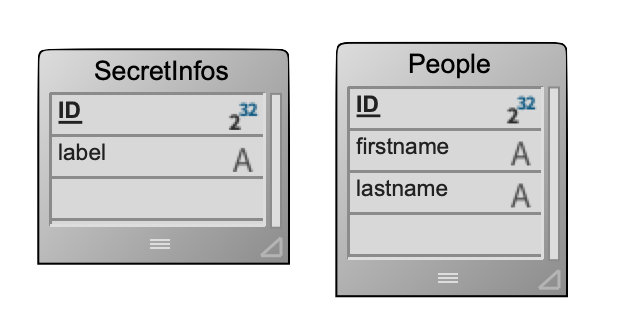
In the roles.json file:

thus:
– it is impossible to access the SecretInfos dataclass (Read, Create, Update, …)
– the viewPeople privilege is required to read the People dataclass, other actions on the People dataclass are not granted
The attached HDI demonstrates that.
Don’t wait to set up permissions to secure your application and your data while handling accurate and appropriate user profiles.
Got a question, suggestion or just want to get in touch with the 4D bloggers? Drop us a line!
* Your privacy is very important to us. Please click here to view our Policy
Comments are not currently available for this post.