
Direct Access to 4D Corner from Your Project

October 19, 2026
2 min read

Finding the right component can make a big difference in a development project. Whether you need a specific feature, want to extend your application’s capabilities, or simply want to discover what the 4D community has created, 4D Corner is the place to explore. You can browse and discover community-created components, add them to your projects, and even share your own components with other 4D developers.
New 4D Corner links are available directly in the project’s component dependency interface.
From there, you can quickly:
To make component discovery as convenient as possible, 4D Corner can be accessed from two different locations in the dependency management workflow.
You can also access 4D Corner from the more options menu of the Project Dependencies window.
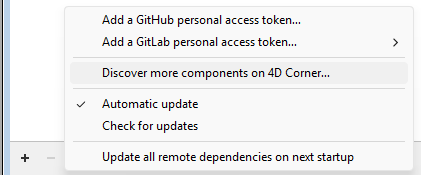
Finally, when you choose to add a new dependency, the Add Dependency window also provides direct access to 4D Corner.

Ready to discover your next component?
With three convenient ways to access 4D Corner directly from the dependency management workflow, discovering and integrating new components is now easier than ever.
Want to learn more about 4D Corner and how you can discover, use, and share components with the 4D community? Check out our 4D Corner blog post.
Got a question, suggestion or just want to get in touch with the 4D bloggers? Drop us a line!
* Your privacy is very important to us. Please click here to view our Policy
Comments are not currently available for this post.