4D Blog

Home Product 4D View Pro: Get control over your 4D method settings

4D View Pro: Get control over your 4D method settings

August 22, 2019

Product

4D View Pro is getting more feature-rich with every R-release and 4D v17 R6 is no exception! A new command is available which allows you to specify a 4D method’s parameters, name, type, and a summary. Now your methods can be more informative and descriptive, helping end users to use them correctly.

Do you want to declare a date or time? What about giving a short description to help users understand what the method does? It can now be done with VP SET ALLOWED METHODS command!

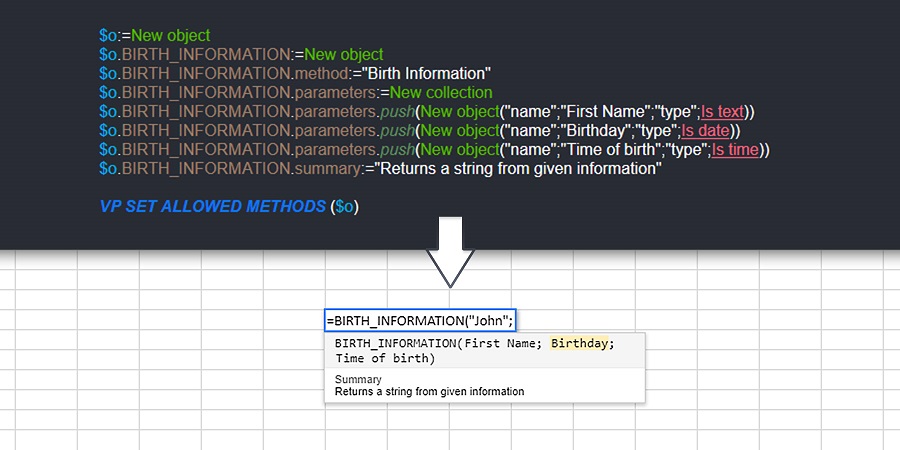
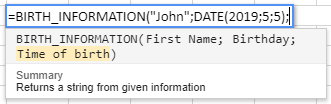
What better way to understand the use of this command than an example? By the time you’ve finished reading and following the example steps, you’ll be able to get the result below:
A step by step example

The VP SET ALLOWED METHODS command provides a new way to allow your 4D methods.  Below demonstrates how to proceed if you want to call the “Birth Information” method in a 4D View Pro formula:

C_TEXT($1)
C_DATE($2)
C_TIME($3)
C_TEXT($0)
// Create a string from parameters
$0:=$1+" was born on "+String($2)+" at "+String($3)

How to Allow a method

Create an object and use the object’s attribute to define your method’s call name:

$o:=New object
// Name of the method in 4D View Pro: "Birth Information"
$o.BIRTH_INFORMATION:=New object

Then in the $o.BIRTH_INFORMATION object, define the called 4D method:

$o.BIRTH_INFORMATION.method:="Birth Information"

Add name and type for each parameter

Add a collection with information about the method’s parameters:

$o.BIRTH_INFORMATION.parameters:=New collection
$o.BIRTH_INFORMATION.parameters.push(New object("name";"First name";"type";Is text))
$o.BIRTH_INFORMATION.parameters.push(New object("name";"Birthday";"type";Is date))
$o.BIRTH_INFORMATION.parameters.push(New object("name";"Time of birth";"type";Is time))

Add a summary

Specify a summary of what your command does:

$o.BIRTH_INFORMATION.summary:="Returns a string from birth information"

Specify the number of parameters

Finally, you can limit the number of arguments in your 4D View Pro formula by adding minimum and maximum values. For example, if all of the parameters are mandatory:

$o.BIRTH_INFORMATION.minParams:=3
$o.BIRTH_INFORMATION.maxParams:=3

You can create as many attributes as a method requires, then pass the method object ($o) to the VP SET ALLOWED METHODS command:

VP SET ALLOWED METHODS ($o)

Discuss

Tags 4D View Pro, Spreadsheet, v17 R6, v18

Latest related posts

  • February 3, 2026

    4D Write Pro – Adding a margin automatically when bullets are set using standard actions

  • January 22, 2026

    Transform Static Documents into Actionable Knowledge with AIKit

  • January 22, 2026

    Deploy Fluent UI effortlessly in your 4D applications

Fabrice Mainguené
Fabrice Mainguené
• Product Owner •Fabrice Mainguené joined 4D Program team in November, 2016. As a Product Owner, he is in charge of writing the user stories then translating it to functional specifications. His role is also to make sure that the feature implementation delivered is meeting the customer need.After obtaining a Bachelor degree in Computer Science at CNAM, Fabrice joined a small software publishing company as a Windev developer. Then he worked for different companies in industry and trade areas as a Windev and web developer as well as technical advisor on new features.
  • Deutsch
  • Français
  • English
  • Português
  • Čeština
  • Español
  • Italiano
  • 日本語

Categories

Browse categories

  • AI
  • 4D View Pro
  • 4D Write Pro
  • 4D for Mobile
  • Email
  • Development Mode
  • 4D Language
  • ORDA
  • User Interface / GUI
  • Qodly Studio
  • Server
  • Maintenance
  • Deployment
  • 4D Tutorials
  • Generic
  • 4D Summit sessions and other online videos

Tags

4D AIKit 4D for Android 4D for iOS 4D NetKit 4D Qodly Pro 4D View Pro 4D Write Pro 20 R10 21 21 R2 Administration AI Artificial Intelligence Build application CI/CD Class Client/Server Code editor Collections Formula Listbox Logs Mail Microsoft 365 Network Objects OpenAI ORDA PDF Pictures Preemptive Programming REST Scalability Security Session Source control Speed Spreadsheet Tutorial UI User Experience vscode Web Word processor

Tags

4D AIKit 4D for Android 4D for iOS 4D NetKit 4D Qodly Pro 4D View Pro 4D Write Pro 20 R10 21 21 R2 Administration AI Artificial Intelligence Build application CI/CD Class Client/Server Code editor Collections Formula Listbox Logs Mail Microsoft 365 Network Objects OpenAI ORDA PDF Pictures Preemptive Programming REST Scalability Security Session Source control Speed Spreadsheet Tutorial UI User Experience vscode Web Word processor
Subscribe to 4D Newsletter

© 2026 4D SAS - All rights reserved
Terms & Conditions | Legal Notices | Data Policy | Cookie Policy | Contact us | Write for us


Subscribe to 4D Newsletter

* Your privacy is very important to us. Please click here to view our Policy

Contact us

Got a question, suggestion or just want to get in touch with the 4D bloggers? Drop us a line!

* Your privacy is very important to us. Please click here to view our Policy