
Searching Across Host Projects and Components in 4D

January 21, 2026
2 min read

When working on a large 4D application, it is common to split functionality across a host project and several components. This modular architecture keeps things clean, easy to organize, and maintainable, but it can also create a challenge: figuring out where a method is used.
Since 4D 21, a major improvement has made this workflow even smoother: you can now edit a component’s source code directly from the host project, without switching contexts. And with 4D 21 R2, the Find in Design dialog has been enhanced to search not only within the host project, but also across all accessible components created in project mode with their source code available.
The most important improvement is the ability to perform a search not only in the host project but also in all accessible components.
You can now choose exactly where to search:
Host project only
One component
Host project together with all accessible components

Each result coming from a component now includes the component name in parentheses. Tooltips have also been improved. When hovering over a result line, the tooltip includes the component name.
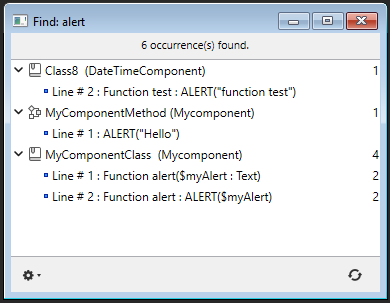
Many users want to process search results externally for auditing, documentation generation, or code reviews. To support this, exported search results now include the project or component name each found item belongs to in the first column:
{
	"type": "text",
	"in": "'My host project' and components",
	"operator": "contains",
	"what": "alert",
	"caseSensitive": false,
	"searchInForms": true,
	"searchInMethods": true
}

DateTimeComponent	class	[class]/Class8	method	ALERT("function test")	2
Mycomponent	projectMethod	MyComponentMethod	method	ALERT("Hello")	1
Mycomponent	class	[class]/MyComponentClass	method	Function alert($myAlert : Text)	1
Mycomponent class [class]/MyComponentClass method ALERT($myAlert) 2These evolutions significantly improve code exploration, refactoring, and maintenance, especially in modular architectures built around components. If you work with multi-project setups, these improvements will save you time, reduce errors, and give you a clearer overview of how your application is structured.
Got a question, suggestion or just want to get in touch with the 4D bloggers? Drop us a line!
* Your privacy is very important to us. Please click here to view our Policy
Comments are not currently available for this post.