
Streamline Your Clean-Up Code with the “defer” Command

July 13, 2026
4 min read
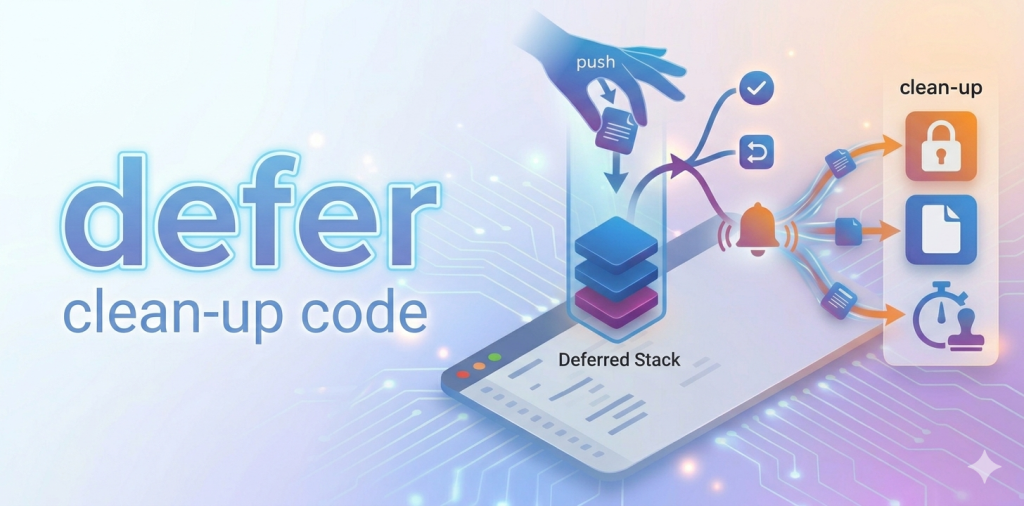
What’s more tedious than writing repetitive clean-up code at every possible exit point of a complex method?
Whether you are managing document closings, resetting interprocess flags, or freeing up resources, ensuring that your housekeeping tasks execute flawlessly—no matter how or where your function terminates—has always required careful structural planning. If a method aborts unexpectedly or hits an early Return, forgetting a single clean-up line can lead to memory leaks or locked resources.
Starting with 4D 21 R4, those worries are a thing of the past. Say hello to the new defer command: a powerful, modern control-flow command designed to make your 4D code cleaner, safer, and much more elegant.
Let’s dive into how it works and how it will transform the way you write 4D code!
The concept is beautifully simple: the defer command allows you to stack an expression that will automatically execute only when the current method or function finishes running.
When the execution flow encounters a defer statement, it doesn’t run the expression right away. Instead, it securely pushes it onto a dedicated internal “deferred stack“.
The magic happens when your method or function exits. No matter how it completes, 4D will automatically pop all the expressions from the deferred stack and execute them in LIFO order (Last In, First Out).
This guaranteed execution triggers under all exit scenarios:
To see the power of defer, let’s look at two classic examples where this command radically simplifies your development.
When dealing with external resources like XML trees, database transactions, or something else, you must ensure they are closed properly to avoid memory leaks. With defer, you can place your allocation and your clean-up code side-by-side:
var $root : Text

$root:=DOM Create XML Ref("rootName")

// Ensure the XML tree will be closed and memory freed, no matter what happens next!

defer(DOM CLOSE XML($root))

// Do something with the $root tree...
Sometimes your code needs to temporarily alter a global database parameter or an environment setting (like turning on heavy diagnostic logging for a specific complex operation) and ensure it gets restored to its original value afterward. The defer command handles this state restoration beautifully:
// Get the current state of diagnostic log recording

$logRecording:=Get database parameter(Diagnostic log recording)

// Temporarily enable it for this specific process/method

SET DATABASE PARAMETER(Diagnostic log recording; 1)

// Guarantee the original state is restored as soon as the method/function exits!

defer(SET DATABASE PARAMETER(Diagnostic log recording; $logRecording))

// Execute your complex or heavy operations here...
We designed this feature with safety and robustness in mind. You won’t have to worry about a failing clean-up task breaking your application’s exit flow.
If an expression executed from the deferred stack throws an error, 4D automatically catches it behind the scenes without any interruption. It seamlessly continues executing the rest of the stack, behaving exactly as if the expression ran inside an implicit try block.
To keep your code straightforward and avoid infinite loops or unpredictable behaviors, we also implemented a few safeguard rules:
When your deferred expressions execute at the very end of a method/function, 4D handles the variable context seamlessly: standard local variables retain the values they had at the exact moment they were deferred, while process variables, local object variables, and classic records reflect their final state at the method/function completion.
Available starting with 4D 21 R4, the defer command is more than just a convenience; it’s a structural upgrade for your development workflow. By grouping initialization and cleanup together at the top of your logic, your code becomes more readable, more maintainable, and more resilient to unexpected runtime aborts.
Are you ready to write cleaner and safer 4D applications? Tell us what you think on the 4D Forum!
Got a question, suggestion or just want to get in touch with the 4D bloggers? Drop us a line!
* Your privacy is very important to us. Please click here to view our Policy
Comments are not currently available for this post.